Your company already has AI agents, automation tools, and frameworks to manage them. But something breaks, or maintaining the system takes more engineering effort than expected. You’ve heard that an orchestration layer might help. But do you need another piece of infrastructure on top?
Not always. Drawing on real-world implementations and insights from AI engineers, we’ll explain when a dedicated orchestration layer makes sense and how to implement one without unnecessary complexity.
What is an AI orchestration layer?
An AI orchestration layer is software that coordinates and controls LLMs and autonomous agents across business applications, data, and tools. Agents can decide how to complete individual tasks; the orchestration layer manages the overall process. Namely, it decides which steps run, what information each step receives, and which policies apply.
How does an AI orchestration layer work?
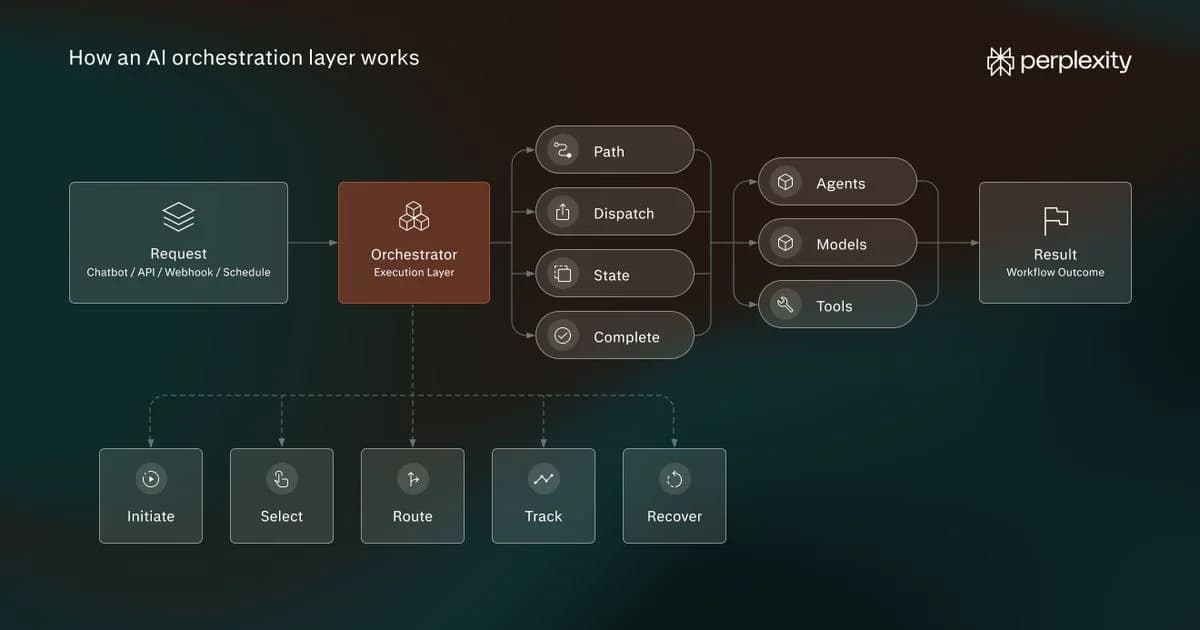
Put simply, an orchestration layer (a so-called orchestrator) executes a workflow by receiving a request or event, determining which tasks need to run and in what order, assigning them to AI agents or tools, and passing data between applications. Workflows may follow predefined dependencies, represented as a directed acyclic graph (DAG), or use dynamic agent loops where subsequent actions depend on previous results.
Here’s what typically happens when a request reaches the orchestration layer:
- Workflow initiation through a chatbot, API, webhook, or scheduled event. The orchestration layer identifies the workflow to run and creates an execution record with a unique ID.
- Execution path selection. For a predefined workflow, the orchestrator follows configured steps and dependencies. For an agent-driven workflow, an LLM may select the next action based on the task and available tools.
- Task assignment and data exchange. The orchestrator invokes the appropriate agents, models, or tools and passes the required inputs between them.
- Progress tracking. The orchestration layer saves completed steps, intermediate results, and pending actions in persistent storage. This allows workflows to resume after interruptions without starting over. It also coordinates permission checks and human approvals when required.
- Workflow completion. Failures trigger retries, recovery from a saved checkpoint, or escalation. The orchestrator verifies the outcome and returns the result.
When do you need an AI orchestration layer?
Enterprise teams don’t need an orchestration layer merely because they have multiple agents or software. Orchestration becomes relevant when execution across those applications needs coordination, shared state, and governance.
But the clearest sign is not technical.
Rahul Kumar, VP of AI Engineering at Xenoss, argues that orchestration only makes sense when the business can count the workflows they want to automate end-to-end on their fingers. “Each one needs a baseline for today’s cost or time, and KPIs that map straight to business KPIs. Until then, teams keep spinning their wheels and chasing shiny objects,” he adds.
Signals your architecture needs shared orchestration
Here’s what “ready” looks like for enterprise orchestration considering your current setup and business goals, according to Kumar:
- Invoice processing: Cost per invoice is $8 today, and the target is under $2.
- Customer support triage: Average handle time is 12 minutes, but the goal is to resolve 40% of tickets without a human.
- KYC (Know Your Customer) onboarding: Approval takes three days, but the target is same-day approval.
Each of these has a clear before, a clear after, and a business owner who cares about the number. Then, layer in technical limitations:
- AI tools work in silos. You have agents in sales, marketing, and customer support, but you need some middleware to share information or coordinate tasks.
- Workflows involve multiple tools and dependencies. Your agents now need to hand off work to each other to finish it.
- You can’t reliably track what happened. When something goes wrong, it’s difficult to tell which agent made a decision or which tool it called.
- Different teams are rebuilding the same controls. Different teams are implementing their own permission checks, retry logic, monitoring, and model integrations instead of sharing them across workflows.
That’s when an orchestration layer pays off. If not, stay with individual agents or simple automation.
When a simpler approach is enough
Sometimes, it’s still hard to decide whether a team has to build an orchestrator. Our advice is to look at the complexity of the current workflow you’re trying to coordinate. If you’ve connected an LLM to your CRM to summarize customer records, for example, and it works reliably, there’s no reason to add another piece of infrastructure.
We’ve compared common AI setups and the tools that may be sufficient to manage them without introducing a separate orchestration layer.
Setup
What might be enough
One LLM performing a specific task
A direct model API integration
A predictable sequence of steps
A workflow automation tool like n8n
One AI agent using several tools
An agent framework or runtime
Several agents collaborating on a task
An agent framework with orchestration capabilities
Multiple AI workflows across departments, requiring shared security, monitoring, and recovery
A dedicated enterprise orchestration layer may make sense
And if your goal is to automate multi-step research, analysis, or reporting rather than build a custom AI application, you may not need to develop an orchestrator at all. Perplexity Computer already delegates tasks across specialized AI agents and models, with access to connected business tools.
Core components of enterprise AI orchestration
An AI orchestration layer relies on software components that coordinate model and agent execution, track workflow progress, connect enterprise applications, and enforce operational controls.
Understanding these components helps AI engineers identify which capabilities existing infrastructure already provides and which are missing. Some are built directly into the orchestration runtime (the engine that executes AI workflows) or provided through integrations with existing enterprise infrastructure.
Model and agent routing
Model routing chooses an AI model for an inference request based on factors such as task requirements, cost, latency, context length, or data residency. For example, an orchestration layer might route document classification to a smaller model and complex reasoning to a more capable one.
Agent routing selects a specialized AI agent for a task based on its capabilities, available tools, and permissions. For example, a customer support agent might retrieve account information, while a billing agent handles invoice-related questions.
Routing doesn’t always require a generative LLM. Perplexity’s Decider models, for example, return classification probabilities that developers can use to route straightforward requests to smaller models and more complex ones to more capable models.
Workflow runtime, agent registry, and state management
These components manage how workflows run, which agents are available, and what information is retained during execution.
Workflow runtime executes tasks, manages dependencies and timeouts, and coordinates retries or recovery when a task fails. Runtimes that support durable execution can persist execution history or checkpoints, allowing workflows to resume after interruptions.
Agent registry maintains information about available AI agents, including their capabilities, owners, versions, and tool interfaces. The orchestrator can use this information to discover suitable agents and route tasks to them.
Rahul Kumar compares an agent registry to a code repository: “The repo comes first, and every piece of work goes into it from day one.” His point is that enterprises should register agents and automations from the start because every automation brings new complexity. That means tracking their ownership, purpose, model versions, data access, performance, and costs.
Workflow state stores execution data, such as completed tasks, intermediate results, pending approvals, and checkpoints. This information helps the orchestrator determine where a workflow should resume after an interruption.
Agent context and memory provide information needed for reasoning. Context includes current instructions, conversation history, and retrieved documents, while memory refers to information retained for later use, potentially across interactions.
Enterprise integrations
Enterprise integrations connect an orchestrator to business applications, databases, and external tools to retrieve information and perform authorized actions. These connections typically use APIs, prebuilt connectors, and webhooks to exchange data or trigger workflows.
For example, an orchestrator might use a Salesforce API to retrieve customer records, query ServiceNow for open support tickets, and invoke an SAP API to create an approved credit memo.
Some workflows also need information from outside the company’s systems. For these, developers can use Perplexity’s Search API to retrieve ranked web results with extracted page text and pass them to agents for further analysis.
Governance, security, and observability
An AI orchestration layer needs components that control agent actions and record how workflows execute. These controls may be built into the orchestration software or provided through integrations with enterprise security and monitoring tools.
The main components include:
- Identity and access management (IAM) that provides user and agent identities and supports permission checks.
- A policy engine that evaluates proposed actions against predefined rules.
- Audit logging and distributed tracing that capture workflow execution across models, agents, and API calls.
- Monitoring and telemetry that collect latency, model usage, API errors, and execution metrics.
Enterprise AI teams can also use Perplexity’s open-source SPACE sandbox platform to run agent-generated code in isolated virtual machines, restrict network access, and keep credentials outside the execution environment. This helps contain faulty or compromised agents before they can affect other enterprise systems.
AI orchestration vs. agent frameworks, workflow engines, and LLM gateways
Calling orchestration another technology category competing with frameworks and gateways isn’t quite right. An enterprise orchestration layer can be an architecture assembled from these technologies. Meaning, enterprise architects need to understand which coordination capabilities their existing tools already provide and which are missing.
What it does
Where it fits
Agent framework/runtime (e.g., LangGraph, CrewAI)
Defines agent behavior, tool use, task delegation, and execution flow. Some support persistent state, approvals, and recovery.
Coordinating agents within AI applications.
Workflow engine (e.g., Temporal)
Executes long-running processes, tracks dependencies, persists execution history, and manages retries and recovery.
Keeping AI and non-AI business processes running reliably.
LLM gateway (e.g., Portkey)
Provides centralized model access, request routing, credential management, and usage monitoring.
Managing model traffic across applications and providers.
Enterprise AI orchestration layer
Combines the required coordination capabilities with shared integrations, execution controls, and visibility across AI workflows.
Managing AI workflows that span applications, agents, and business functions.
Enterprise AI orchestration layers in real-world case studies
Enterprise orchestration looks different depending on the problem, the workflow, and other prerequisites. The following examples show how companies use it to route customer inquiries, coordinate real-time recommendations, investigate infrastructure incidents, and execute finance tasks.
Enterprise-wide orchestration: Capita manages over 350 AI agents
Business services company Capita had AI agents running across Salesforce Agentforce, Microsoft Azure, and AWS. With agents deployed on different platforms, the challenge was maintaining visibility, governance, and consistent access to enterprise data.
Capita introduced MuleSoft Agent Fabric as a shared orchestration and governance layer. Its Agent Scanners discover agents across platforms, Agent Registry maintains their inventory, and Agent Visualizer provides execution visibility and telemetry. MuleSoft also connects agents to ERP, CRM, and HR applications through reusable APIs.
Reported results: Governing over 350 production AI agents through MuleSoft and developing APIs 20% faster.
Insurance sales: Xenoss uses AI orchestration to increase conversion rates
Sales reps at a major insurance company struggled to improve conversion rates while explaining complex policies, answering customer questions, and handling objections.
To help the insurer’s commercial team, data and AI development company Xenoss built a real-time AI copilot, according to Rahul Kumar. The system uses an orchestrator to recognize customer objections across 48 categories and direct them to specialized LLMs that generate relevant responses. In parallel, other AI agents analyze the conversation, retrieve applicable policy information, and provide additional context to support the sales process.
The orchestrator combines these inputs to recommend the next best action. Sales reps receive suggestions during live conversations but make the final decisions themselves.
Reported results: Recommendations arrive in under 2 seconds, agents use more than 90% of them, and sales conversion rates increased by 14%.
IT operations: Cornerstone orchestrates 13 specialized AI agents
Cornerstone OnDemand built Orion AI to automate database troubleshooting and IT operations using Amazon Bedrock and Strands Agents.
Its central orchestrator routes engineering requests to 13 specialized agents. It uses keyword matching for straightforward queries and semantic search when the intent is ambiguous. Agents then retrieve live SQL Server diagnostics, investigate blocking queries, or access operational tools through MCP and REST APIs.
The orchestrator collects their findings, coordinates follow-up actions, and requires human confirmation before potentially disruptive operations.
Reported results: Orion AI reduced average database diagnosis time from 45 to 10 minutes. The company also reports a 65% median reduction in redundant alerts.
Customer support: Agibank connects specialized agents in one conversation
Brazilian digital bank Agibank introduced a Salesforce Agentforce superagent to coordinate six specialized AI agents and integrate 11 additional bots into a unified customer-service architecture.
The superagent receives WhatsApp messages, verifies customer identity through Salesforce Service Cloud, and uses the Atlas Reasoning Engine and predefined routing rules to select the appropriate specialist.
A customer can move from checking a loan application to asking about account services without restarting the conversation. The orchestrator preserves context across handoffs and routes fraud- or compliance-related requests to human representatives when required.
Reported results: Agibank’s specialized AI agents handle approximately 70,000 inquiries autonomously per month.
Key benefits and tradeoffs of an orchestration layer
A shared orchestration layer undeniably helps enterprise AI teams with many tasks, but centralizing coordination also introduces new risks: broader access to business data, additional infrastructure dependencies, and more complex failure recovery.
Potential benefit
The tradeoff
Centralized visibility
Requires consistent logging and tracing across applications, which adds instrumentation work and storage costs.
Reusable security controls
Centralized controls can become a bottleneck or critical dependency if they’re poorly designed.
More flexibility
Switching models isn’t always seamless. They may behave differently, return different outputs, or require additional testing.
More reliable execution
Persisting state and managing recovery introduces additional engineering complexity.
Easier scaling across teams
Someone still needs to own the shared infrastructure, manage changes, and support the teams using it.
For Rahul Kumar, security is the first concern. As agents take on more responsibilities, enterprises need to make sure they don’t gain access to information or actions beyond their assigned tasks. He recommends enforcing the same organizational boundaries that apply to employees, with least-privilege access and traceable approvals.
Kumar also cautions against removing humans from consequential decisions, particularly financial transactions and medical decisions. These still need a human for the last mile. His argument is that an AI workflow can satisfy predefined rules without necessarily accounting for every relevant circumstance.
How to evaluate and implement an AI orchestration layer
1. Map one workflow and find where it breaks
Enterprise architects and AI platform engineers need to answer one question: what can’t the existing infrastructure handle? For that, pick an AI workflow that already causes problems or requires too much manual coordination. Map its path from the initial request to the final action, including:
- Agents and models: Which tasks do they handle, and who maintains them?
- Dependencies and handoffs: What information does each agent receive and return? Are outputs validated before the next agent uses them?
- Business applications: Which CRMs, ERPs, databases, or internal APIs do they read from or write to?
- Failure points: What happens when a model times out, an agent returns invalid JSON, or an employee doesn’t approve an action?
Also, record the current completion rate, latency, cost, and manual interventions. These become the baseline for evaluating any changes.
2. Decide whether to build, reuse, or buy
An enterprise orchestration layer doesn’t have to be a new platform. If engineering teams already use LangGraph for agent execution and Temporal for durable workflows, extending that infrastructure could be a sound decision. There’s little value in rebuilding either capability unless your requirements justify it.
If important gaps remain, compare extending your stack with adopting a managed orchestration platform. Factor in engineering maintenance, hosting, security integration, observability, and on-call maintenance.
You also don’t have to build every component from scratch. Perplexity’s Agent API combines multi-provider model access, web search, and tool execution in one managed runtime. It’s worth evaluating if you need those capabilities without maintaining separate integrations for each.
3. Test orchestration capabilities under production conditions
Build a small proof of concept around the workflow mapped earlier. Whether you’re using existing frameworks or evaluating a commercial platform, run the same failure tests:
- Kill a worker mid-execution. Does the workflow resume from the expected checkpoint?
- Timeout an API after a write. Can the integration reconcile the transaction before retrying, or could it create a duplicate?
- Return malformed agent output. Does schema validation prevent invalid data from reaching the next step?
- Deny tool access. Does authorization prevent the agent from accessing restricted data or modifying records outside its permissions?
- Pause for human approval. Can the workflow preserve its state and resume after the decision?
4. Roll out gradually and watch for regressions
As a rule of thumb (and not to break everything else), start with one workflow, limiting which agents can access production data. Add timeouts, retry limits, and alerts.
Once it’s done, watch more than whether runs finish successfully. Check p95 latency, failed tool calls, cost per completed task, and whether the expected changes happened in the connected applications.
As the workflow proves reliable, reuse its connectors and controls across other teams. But every model upgrade, API change, or new agent version deserves a regression test. Something as small as a changed JSON field can break a downstream agent that worked perfectly yesterday. Watch like a hawk for that.
Common AI orchestration layer implementation pitfalls among enterprises
One of the biggest mistakes enterprise AI teams make is choosing an LLM before understanding what the workflow requires. Different models are better suited to different tasks, yet the teams often pick one and use it for everything.
“Gemini 3.5 Flash is excellent at OCR and image understanding, but it’s the wrong choice as an orchestrator. So, each model is designed to do its own job accurately. Very few teams choose models this way,” says Kumar.
As a summary, here are five mistakes to avoid, according to Kumar:
- Using one model for everything
- Stretching an orchestrator beyond its purpose
- Ignoring data quality
- Giving agents too much autonomy
- Letting costs spiral
Frequently Asked Questions About an Orchestration Layer for Enterprises
Does every multi-agent system need an orchestration layer?
No. A multi-agent system needs a way to coordinate agents, but that doesn’t mean it needs a separate orchestration layer. Frameworks like LangGraph and CrewAI already provide agent coordination, and some support state management, human approvals, and failure recovery.
A dedicated orchestration layer is needed when multiple workflows across teams need shared integrations, security controls, monitoring, and recovery. If your existing framework handles these requirements reliably, adding another layer may only increase costs and maintenance.
How should an enterprise deploy the orchestration layer?
The deployment model depends on where an enterprise’s data, AI models, and business applications run.
- A cloud-managed orchestration layer reduces infrastructure maintenance.
- Hybrid or on-premises deployment gives engineering teams more control over sensitive data and access to internal applications.
Before choosing, evaluate data residency requirements, network latency, integration with existing infrastructure, and where credentials, workflow state, and execution logs will be stored. Also test how the orchestration layer behaves when a model provider or network connection becomes unavailable.
How do you know whether orchestration is paying off?
Don’t measure success by how many agents are connected or how many workflows are automated. Those numbers are merely deployment metrics. Instead, track metrics that show the operational impact of an orchestrator:
- Task completion rate: How often does the entire workflow finish successfully?
- Cost per completed task: How much do model calls, tool execution, and orchestration infrastructure cost for a successful outcome?
- End-to-end latency: How long does it take to complete the workflow, including waiting, approvals, and handoffs?
- Human intervention rate: How often does someone need to step in, and is that happening where you intended?
- Recovery performance: How frequently do workflows fail, how often can they recover, and how long does recovery take?
Ideally, measure these before and after introducing orchestration, using comparable workloads. Otherwise, it’s hard to tell whether an improvement came from the orchestration layer, a better model, or changes to the workflow itself.