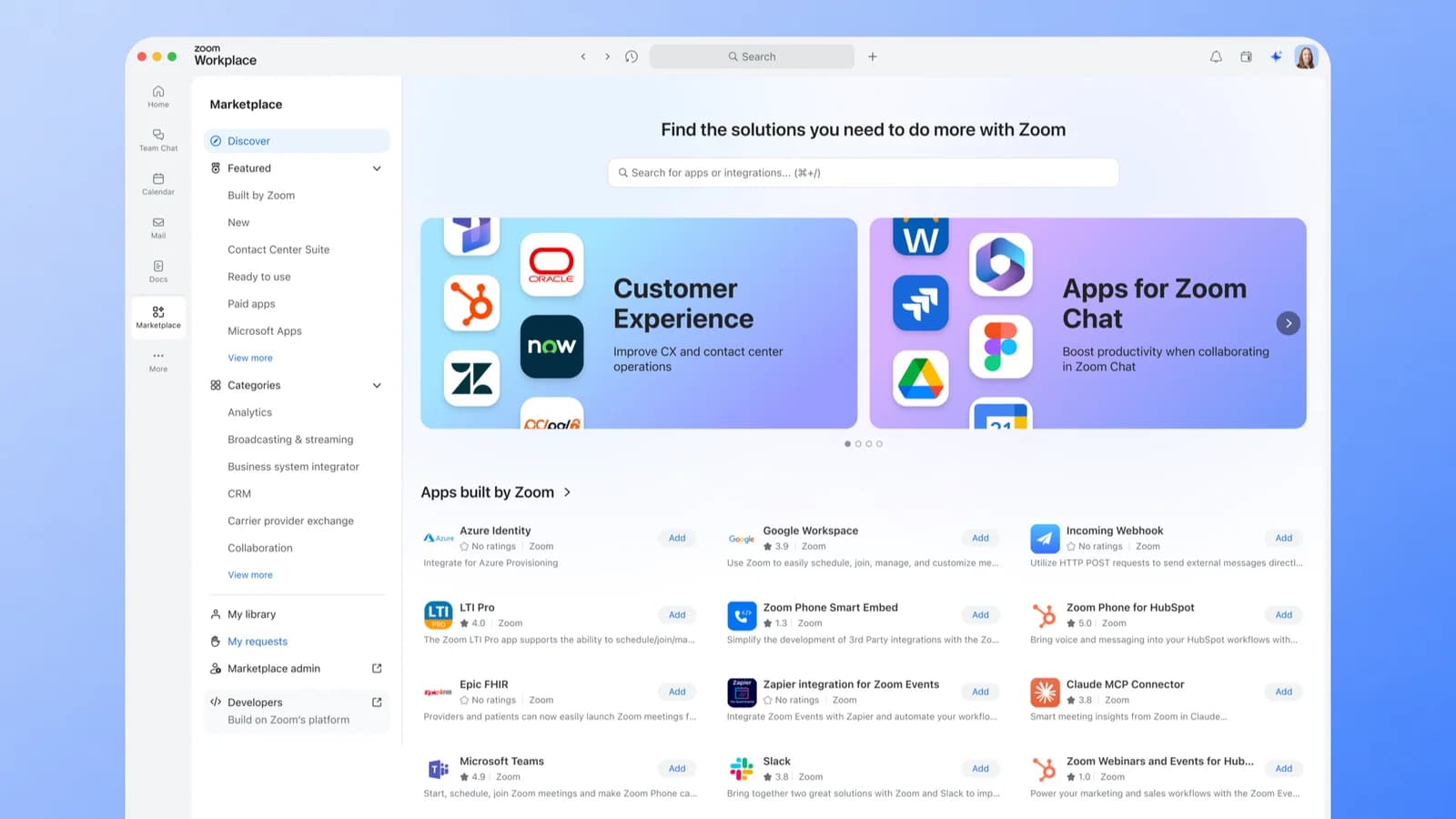
The Zoom Marketplace has surpassed 4,000 published apps.
That milestone reflects the scale of an ecosystem that spans across products in the Zoom platform (from Meetings and Chat to Contact Center, Phone, and ZoomMate) with integrations built by developers and partners around the world.
Zoom is an open platform by design. We believe your collaboration tools should work with the rest of your tech stack, and that philosophy is what drives the Zoom Marketplace: one of the largest app ecosystems in enterprise collaboration, built so the tools your organization depends on can plug directly into the platform you already use every day. And it's not only for third-party software vendors. The Marketplace is also where your own teams can build, publish, and manage apps designed exclusively for your organization.
An ecosystem this large requires enterprise-grade management, security, and governance. That's why we've been shipping a wave of improvements to how you discover, manage, and control apps across your organization. Some you've already noticed. Others are quietly making life easier for the admins who keep everything running behind the scenes.
Browse 4,000+ apps built for the way you work
New and noteworthy
Four thousand apps means the Zoom Marketplace covers an expansive range of enterprise software categories. Here are a few recent additions worth calling out:
- World ID for Zoom: Brings proof-of-human verification tools to Zoom Meetings, helping participants confirm that the people on the other side of the screen are real: a critical layer of trust when conducting business.
- Muse: Zoom now connects with Muse from Meta, giving small businesses a way to bring their Zoom meetings and schedules into Muse's AI experience, to help them stay on top of customer conversations without switching tools.
- New connectors for ZoomMate: Microsoft Power BI for Zoom lets ZoomMate pull up reports and datasets on request; GitLab for Zoom surfaces issues, merge requests, and pipelines; Trello for Zoom keeps project boards in reach; and LinkedIn for Zoom helps bring profile and company context to every conversation.
- Common Room for Zoom: Brings Common Room's buyer signals and sales intelligence into Zoom's AI agents and connects that intelligence to Zoom's outbound dialer so sellers can prioritize and reach the right prospects faster.
- Pindrop Security for Zoom Contact Center: Adds voice authentication and deepfake detection tools to Zoom Contact Center, helping agents verify callers and flag potential fraud in the background of every interaction.
One Marketplace, everywhere
Earlier this year, we unified the Marketplace experience across the Zoom desktop client and the web. The familiar "Apps" tab in your sidebar has been renamed to "Marketplace," and it's now a first-class citizen in the Zoom client, complete with its own sidebar icon.
Whether you're browsing from inside a meeting, from the Zoom client homepage, or on the web, you'll find the same catalog, the same search, and the same experience. Everything (including account switching, developer tools, and admin settings) flows from one unified entry point.
We've also begun rolling out contextual Marketplace experiences: tailored surfaces embedded directly within Zoom products like Contact Center, Canvas, and ZoomMate. Instead of asking you to leave what you're doing to search for an integration, we bring the most relevant apps to you, right where you need them.
Internal publishing: not just a storefront
The Zoom Marketplace isn't just for third-party apps. If your team builds a custom Zoom integration (a departmental workflow, an internal helpdesk tool, an automated reporting dashboard), you can publish it directly to the Marketplace for your organization's users to discover and install, without it appearing on the public catalog. The same request controls that govern third-party app approvals extend to internal apps, so admins retain authority over what gets built, who can access it, and how it's deployed.
For organizations investing in citizen development or internal automation, this changes the calculus. Instead of distributing internal tools through separate channels, you can publish them to the same surface your users already browse for other integrations, with the same enterprise-grade oversight as everything else in your Marketplace.
Behind the scenes: A major upgrade for IT admins
If you're an IT admin responsible for managing how your organization uses Zoom, this section is for you. A marketplace with 4,000+ apps is only as useful as an admin's ability to govern it, and we've shipped a set of improvements to Marketplace administration designed to give you the visibility, control, and auditability that enterprise IT requires.
Marketplace management moves to Admin Center
Marketplace management is now integrated directly into the Zoom Admin Center: the same place you already manage users, settings, and security policies. App approvals, permissions, dashboards, and notification settings now live under one roof, giving you a single, streamlined management experience.
New request controls for app creation and publishing
Admins now have granular controls over how apps are requested, created, and published within their organization. You can configure whether users are allowed to request new apps from the Marketplace, submit apps for internal publishing, or create new integrations, and route each of those requests through approval workflows tailored to your organization's policies.
These controls apply across third-party, Zoom-built, and internally developed apps, so governance stays consistent no matter where an app originates. Marketplace Admins can also make exceptions for Zoom-built apps or apps built by their own account, making it easy for users to access apps from developers they trust.
Admin activity logs
Marketplace permission changes and notification updates are now logged in User Activity Reports, with app approval history tracked in App Requests > Past Requests and authorization changes viewable in App Settings > Activity Logs. This helps give security and compliance teams the audit trail they need to stay confident in their governance posture.
Connection verification & IP allowlisting
Two new security features give admins tighter control over how third-party apps connect to their Zoom environment:
- Connection Verification: Require connected third-party accounts to be governed work accounts, not personal accounts. This helps ensure that when someone connects an external service to Zoom through the Marketplace, it's through an organization-sanctioned account.
- IP Allowlist for All App Types: IP allowlisting now extends across all app types on the Marketplace. If your security policy requires restricting app access by IP range, you can enforce that universally and see the IP ranges for currently added apps.
A growing, smarter ecosystem
The 4,000-app milestone reflects both scale and evolution. The kinds of apps joining Zoom's ecosystem have shifted. In the past year alone, we've seen rapid growth in:
- AI integrations: Apps that leverage Zoom's AI capabilities (including ZoomMate connectors and AI-native tools) are among the fastest-growing categories on the platform.
- Contact center solutions: From workforce management to AI virtual agents, the Marketplace is becoming the go-to hub for extending Zoom Contact Center.
- MCP servers: Developers are building new types of integrations that allow AI agents to interact with Zoom programmatically, representing a new frontier for the ecosystem. Zoom itself now publishes a growing library of MCP servers: from a flagship Zoom server handling scheduling and meeting intelligence, to product-specific servers for Whiteboard, Rooms, Contact Center, and more. These come with ready-made connectors available in Claude, ChatGPT, Codex, Muse, and Microsoft 365 Copilot.
And for developers who want to build on the Marketplace faster than ever, the Marketplace Build MCP Server (coming soon) will let AI agents create and manage Marketplace apps programmatically.
We also introduced Ratings & Reviews earlier this year, giving you a way to evaluate apps based on feedback from other Zoom customers before you install them.
Open by design
Open by design means building an ecosystem where every app is discoverable, every integration is governable, and every organization (from a 50-person startup to a global enterprise) can extend Zoom to fit the way they work. Whether you're installing a third-party integration, deploying a Zoom-built solution, or publishing an app your own team created for internal use, the Marketplace puts all of it in the right users' hands. With 4,000 apps and counting, a unified experience across every Zoom surface, and enterprise-grade admin controls, the Zoom Marketplace is where openness meets the rigor your business demands.
See what your tech stack can do when it works together
Browse apps