Language workbench to create Domain-Specific Languages
Releases
MPS 2026.2 Release Candidate Available
MPS 2026.2 is almost ready! Today we’re making a release candidate build available so you can try out the upcoming release ahead of its official launch. Download MPS 2026.2 Release Candidate now:
Along with numerous bug fixes, the RC brings several key improvements to the previous 2026.2 EAP1 build.
Linux ARM64 support
MPS is now available for Linux on ARM64 (AArch64), with a matching bundled JetBrains Java Runtime.
You can also build standalone MPS-based applications (RCPs) for Linux ARM64. The Build Script Wizard now includes a Linux ARM64 distribution in its generated build scripts alongside the existing platform distributions.
TAR imports in Build Language
Build Language now supports importing archive contents directly into distribution layouts using the new import files from tar and files from tar entries.
You can import files from plain TAR archives or archives compressed with gzip or bzip2. The source can be an archive file or another TAR layout defined in the build script.
When importing into a TAR layout, symbolic links and file permissions are preserved. This is particularly useful when packaging platform-specific plugins and native libraries, as symbolic links remain links instead of becoming duplicate copies of their targets.
Archive packaging changes
MPS 2026.2 preserves symbolic links and file permissions when packaging platform-specific plugins. Previously, symbolic links were sometimes replaced with copies of their targets, causing large native libraries to be included more than once, particularly on macOS.
macOS archive distributions now use .tar.gz instead of .zip to preserve symbolic links. The Build Script Wizard generates the same archive format for standalone macOS applications.
Projectional Agent Toolkit enhancements
Projectional Agent Toolkit has received a major boost in performance and capabilities.
Performance
Your AI agents can now cut back on token usage on common tasks like DSL modeling or implementing language definitions. In our measurements using Claude Code + Opus 5 and 5.5, the savings exceeded 50%.
This improvement is the result of a substantial rework of the MPS MCP API:
- Consistent parameter naming, null and default-value handling, and error reporting.
- More precise descriptions in the skills and tool documentation.
- Bulk operations where they provide the greatest benefit, with compact summaries instead of huge payloads.
- Small read results included directly in responses, with large dumps written to files only when needed.
- One-shot model validation to check full models without round-trip overhead.
- Fast concept discovery using lightweight, structure-only metadata views instead of full AST dumps.
- Fail-fast checks that reject invalid search scopes and mutation inputs instead of returning incomplete results.
- Helper scripts included with the skills, so agents spend less time reinventing common MPS tasks.
- Clearer project targeting when several MPS or IDE projects are open.
Typesystem MCP tool
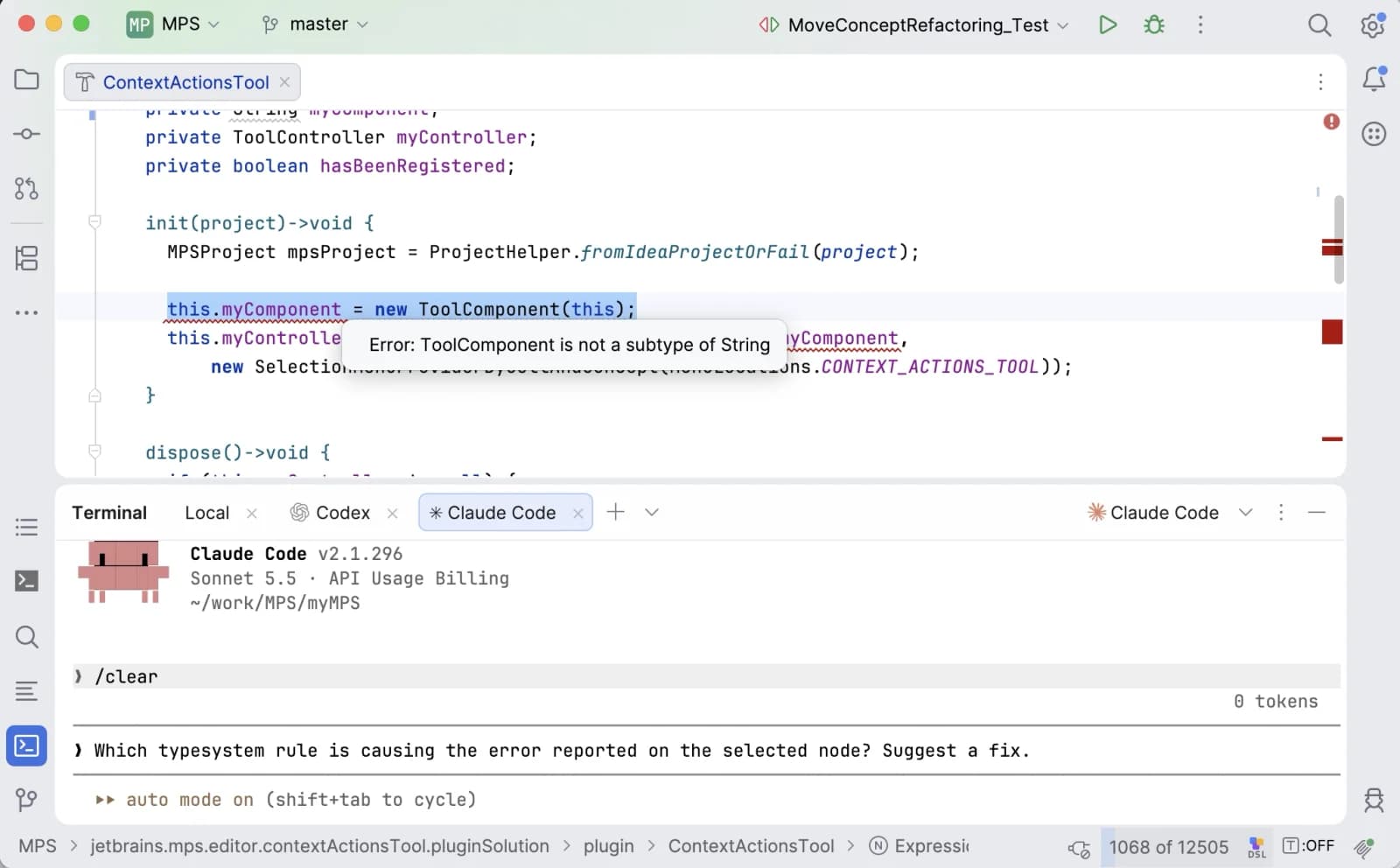
The Typesystem MCP tool enables agents to:
- Understand node types and typesystem messages.
- Compare types and determine the expected type for a role.
- Trace type calculations and debug typesystem rules.
- Identify the typesystem rule responsible for a reported typesystem error.
Other newly added MCP tools
In addition to the Typesystem MCP tool, we’ve added several more MCP tools to cover other core aspects of MPS development. The new tools enable agents to:
- Invoke intentions and quick-fixes.
- Automatically keep their skill database up to date with the MPS instance they connect to.
- Read and filter the content of MPS logs.
- Open, close, and create MPS projects.
- Automatically correct SModel expressions in parsed Java statements, helping agents author concept functions and behavior methods.
Import dialog reworked: Select models and languages to import
The Import dialog has undergone a major overhaul to fix functional issues and bring its appearance in line with the rest of the platform.
- When pasting code between models, only the models and languages you actually select in the dialog are imported. Previously, the dialog ignored your selection.
- If the dialog offers only one suggestion, you can now deselect it. Previously, the single suggestion could not be deselected.
- Both the model and language lists now have checkboxes for individual entries and a header checkbox to select or deselect all entries. The header checkbox shows an indeterminate state when only some entries are selected.
Diff dialog and tab improvements
We’ve made quite a few minor changes to bring the Diff dialog’s look and feel in line with the rest of the platform.
- The model viewer now has its own icon instead of sharing the side-by-side icon. The top bar is vertically centered, and the left and right panels match the splitter background.
- Diffs of added or deleted models and of per-root persistence models now have aligned title bars, so separator lines no longer drift when one side is empty.
- Change markers on the scrollbar now remain in the right position when the dialog or editor is resized. Previously, a marker would sometimes jump to an unrelated location. The fix was made in the shared editor gutter, so regular editor error and warning markers are covered, too.
- Editor hints defined in your language now appear on the left (read-only) diff panel for file-per-root persistence and on the right panel for per-root persistence models.
You can review the complete list of fixed issues here.
Your JetBrains MPS team