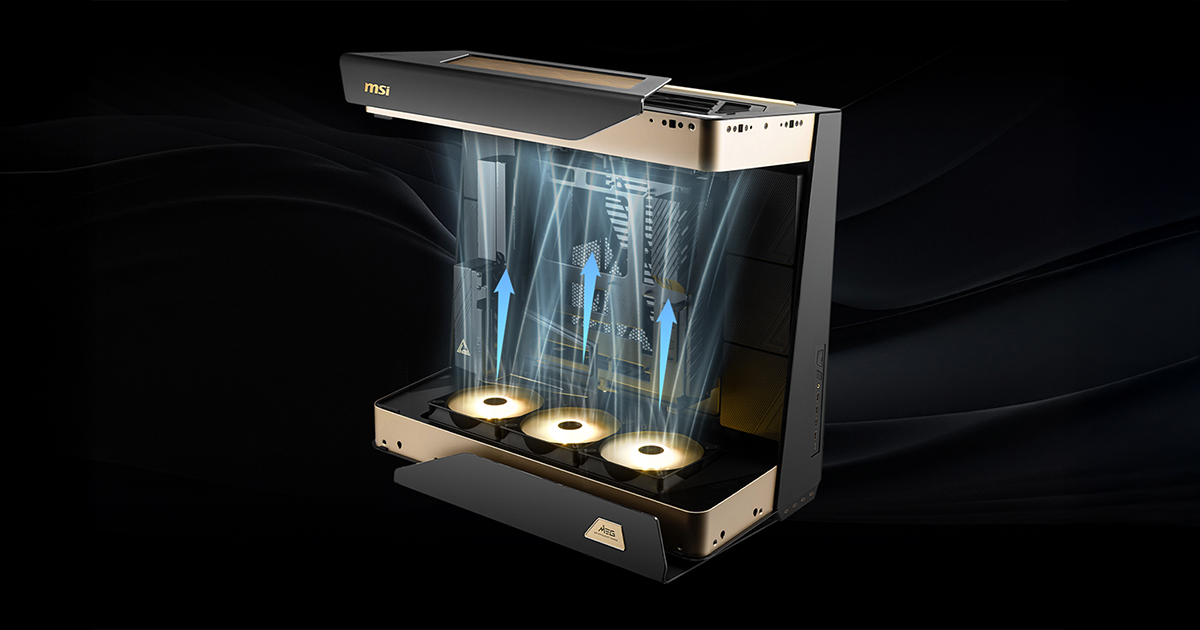
The MEG MAESTRO 900R supports four motherboard orientations and four cooling zones, but every recommended configuration starts with the same airflow direction. Use the three preinstalled 160 mm bottom fans as intake and the top fans or top-mounted radiator as exhaust. This moves cool air through the centered hardware area and removes warm air through the top of the case.
Once this path is established, the side mounts can be assigned according to the radiator position, GPU mounting direction, and display priorities. The layouts below are MSI Thermal Lab's recommended starting points from the thermal validation matrix. Each one should be treated as a complete fan, radiator, motherboard, and GPU configuration rather than a comparison of motherboard orientation alone.
SET THE AIRFLOW DIRECTION FIRST
Bottom Fans
Keep the three preinstalled 160 mm reverse-blade fans as the primary intake. They bring cool air into the case below the graphics card and motherboard, then feed the vertical airflow path through the center of the system. Avoid blocking this area with loose cables or accessories.
Preinstalled 160 mm Fan Specifications
Rated value per fan
Speed
500-1400 RPM ±10%
Airflow
113.92 CFM max
Top Fans and Radiator
Use the top position as exhaust. If the AIO radiator is installed at the top, its fans should also exhaust warm air from the case. This keeps the main airflow moving in one direction instead of recirculating heated air around the CPU and GPU.
Side Fans and Radiator
The two side positions are the tuning zones. A side fan bank can supply additional intake near the GPU, while a side-mounted radiator can remove CPU heat before it reaches the top of the case. Set each side according to the selected layout, but keep the bottom intake and top exhaust unchanged.
Maintain Slight Positive Pressure
Aim for slightly more effective intake airflow than exhaust airflow. This helps the case draw most of its incoming air through the filtered intake areas instead of unfiltered gaps. Use rated CFM only as a starting point because filters, radiators, panels, and fan speed reduce real airflow.
Estimated airflow balance = total effective intake CFM − total effective exhaust CFM
At maximum rated speed, the three preinstalled 160 mm fans provide a theoretical combined intake of 341.76 CFM before restriction. After assembly, adjust the intake and exhaust fan curves while monitoring CPU and GPU temperatures under sustained load.
CHOOSE A LAYOUT FOR YOUR BUILD PRIORITY
Start with the model that matches the component or presentation goal you care about most. The fan directions shown in each diagram are part of the recommendation.
For CPU Cooling
This model is the recommended starting point when CPU cooling is the priority. Install the MEG CORELIQUID E15 360 on the left side as exhaust (it can also be installed on the right side, although this configuration requires more careful cable and tube routing), keep the three bottom fans as intake, and use the MPG EZ120R ARGB at the right side to supply additional fresh air. The top MPG D160 ARGB fans exhaust the remaining heat. This layout uses a horizontal graphics card and positions the motherboard rear I/O on the left.
For GPU Cooling
This model is the recommended starting point when GPU cooling is the priority. The graphics card is mounted vertically, with pre-installed 160 mm bottom fans and right-side MPG EZ120R ARGB intake feeding cool air into the GPU area. Mount the MEG CORELIQUID E15 360 at the top and MPG EZ120 ARGB at the left as exhaust so radiator heat leaves the case directly instead of passing back through the graphics card zone.
For Display Integration
This model is intended for builders who want to install a display module such as the MAG VIEW XPANDER 12 on the right side. Mount the MEG CORELIQUID E15 360 on the opposite side as exhaust, retain the bottom intake, and use the top MPG EZ120R ARGB fans as exhaust. Because the display occupies one side zone, keep the bottom air path clear and tune the remaining fans to maintain positive pressure.
For a Symmetrical Build
This model is the recommended starting point for a balanced, symmetrical view of the centered hardware. It uses a horizontal graphics card, places the motherboard rear I/O on the left, and mounts the MEG CORELIQUID E15 360 at the top as exhaust. Pre-installed 160 mm fans at the bottom and right-side MPG EZ120R ARGB intake supply fresh air, while the left side MPG EZ120 ARGB helps exhaust heat. This configuration prioritizes the overall presentation rather than the lowest temperature for one component.
Custom Liquid Cooling
Builders seeking maximum cooling potential and greater freedom to customize the layout can step beyond the recommended AIO configurations with a custom liquid-cooling loop. The case supports radiator up to 420 mm at both the top and bottom (For detailed radiator clearance information, please refer to pages 7-8 of the user manual: Link), with room for reservoirs, pumps, and hardline tubing, fitting clearance, component placement, and tubing routes together before assembly.
START YOUR BUILD AROUND YOUR PREFERENCES
The MEG MAESTRO 900R is designed to support different ways of building and presenting a flagship system. Its four-way rotatable motherboard tray, centered architecture, panoramic glass, and broad cooling support allow builders to choose the motherboard orientation, GPU mounting style, and cooling hardware that best fit their components and preferred view.
The four recommended layouts are starting points rather than a ranking. There is no single best layout for every build. Choose the configuration that suits the hardware you want to use, the components you want to highlight, and the cooling priority of the system. Whichever orientation you select, maintain bottom intake and top exhaust as the primary vertical airflow path.
With the vertical airflow path in place, the remaining fan positions and cooling hardware can be tuned around your preferred balance of thermal performance, acoustics, and presentation.
APPENDIX: THERMAL VALIDATION PLATFORM
MSI Thermal Lab evaluated multiple configurations using an AMD Ryzen 9 9950X3D processor and an MSI GeForce RTX 5090 32G VANGUARD SOC graphics card. Based on the test results, four recommended layouts were selected to accommodate different build priorities. The matrix varied motherboard-tray orientation, graphics-card mounting, radiator position, fan placement, and other installation choices. Testing used the 3DMark v2.31.825 Fire Strike Ultra Combined Test at 4K.
Final temperatures will vary with component power, room temperature, fan curves, radiator restriction, and cable placement. Test the completed system using the workloads you actually run, then adjust fan speeds to meet both thermal and acoustic targets.
Test item
Validation setting
Motherboard
MEG X870E GODLIKE X EDITION
Processor
AMD Ryzen 9 9950X3D, 16 cores, 4.3 GHz
Graphics card
MSI GeForce RTX 5090 32G VANGUARD SOC
Memory and OS
DDR5-6000 32 GB × 2; Windows 11 Pro 25H2, build 26200.6584
CPU tuning
Precision Boost Overdrive set to Auto; TDP set to Auto; no manual CPU overclock applied
GPU tuning
Factory SOC settings; no additional manual GPU overclock applied
Cooling duty
MEG E15 AIO fans at 80%; all system fans at 100%