Agentic AI AI Coding JetBrains AI
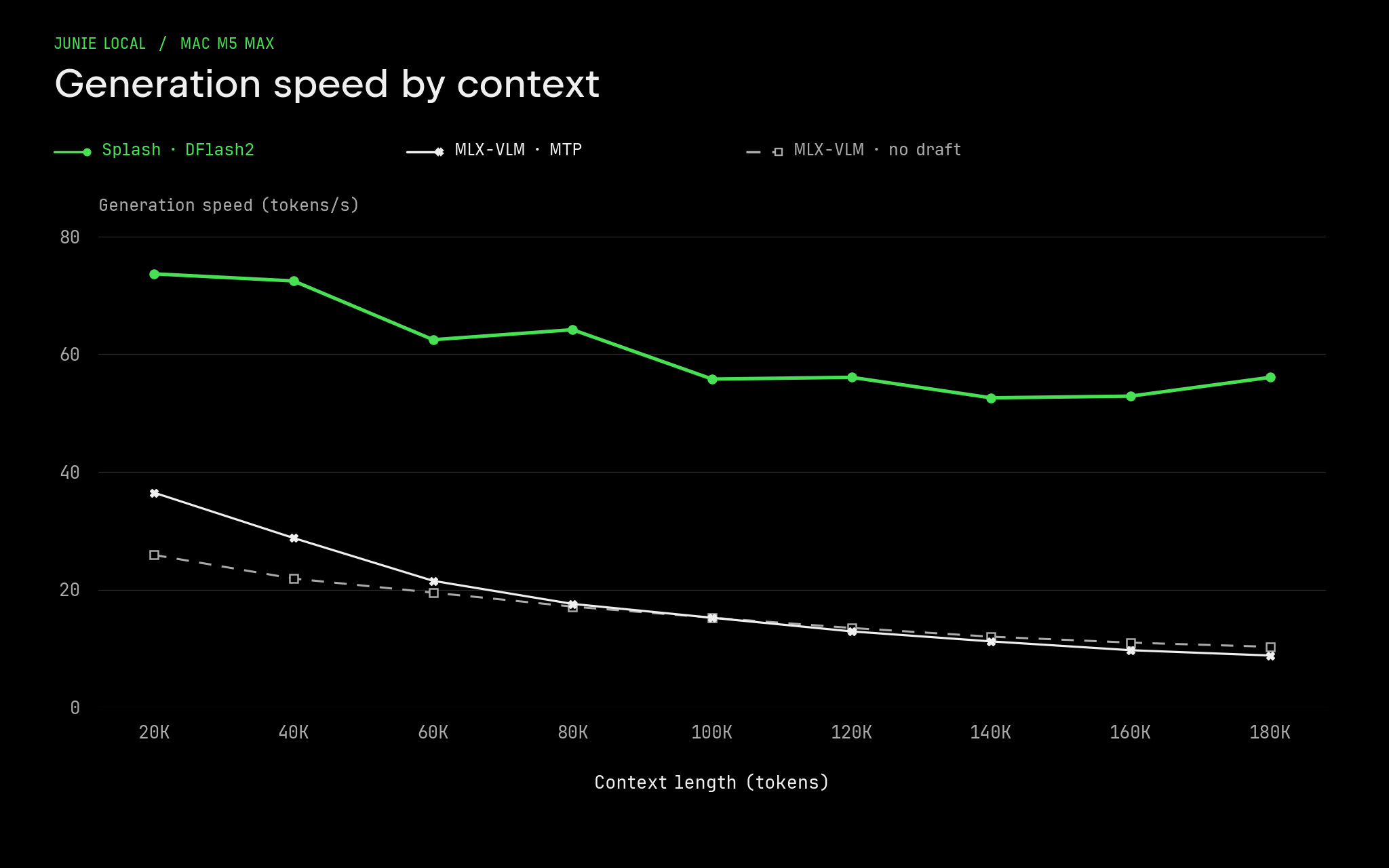
Junie Local now delivers ~70 tokens/s on M5 Max for coding tasks, up from ~40 tokens/s, with bursts up to 107 tokens/s. Two changes made this possible: the Splash inference engine and a new DFlash2 draft model.
Back in August, when we first released Junie Local for Mac M5, we spent a lot of time optimizing Junie and the MLX-VLM inference engine to achieve the maximum possible (at that time) performance. But two months is apparently a very long period at the current pace of LLM development. During this time, new, exciting ways to speed up inference were released by the community. We looked at and tested all of them, then picked the most promising parts to include in Junie Local.
In September, Inco AI released its Splash engine, built around the Qwen models. Focusing on just a couple of models lets Splash do what a general-purpose engine can’t: every decode step verifies eight drafted tokens at once, and attention over the context costs an order of magnitude less per position, so decode speed barely drops as context grows. The prefill, though, was on par with our optimized MLX-VLM engine. Since we had already taught MLX-VLM to use int8 operations on M5 chips, we ported the same optimization to Splash. In this release, Splash replaces MLX-VLM as Junie Local’s inference engine.
But a good engine is only part of the equation. We also needed a model-drafter that would enable more efficient speculative decoding. When using a speculator, acceptance rate defines the decode speed. A low acceptance rate could make decoding even slower.
Out of the box, Splash uses the DFlash2 drafter model for Qwen 3.8-27B. But Qwen 3.8 has a slight issue – it tends to overthink a lot. So the whole win of the generation speed is killed by the enormous amount of thinking tokens that need to be generated.
To address this problem, we previously released the Qwen3.8-3.6-27B-blend, which is more capable than Qwen 3.6 yet uses only 30% more tokens. And in this release, we are also including the DFlash2 draft model for Qwen3.8-3.6-27B-blend.
DFlash-based models are fast but very sensitive to in-domain distribution: acceptance rate on familiar tasks is higher, so the agent will work faster on familiar tasks and slower on unfamiliar ones.
To train this DFlash2 model, we generated a diverse set of agentic coding trajectories by running the Junie Local harness inside our internal coding environment with Qwen3.8-3.6-27B-blend. We then took the Qwen 3.8 DFlash2 draft model as a starting checkpoint and fine-tuned it with SpecForge on those coding trajectories. This way, our DFlash2 drafter delivers the highest speed and acceptance rate when you use it to code with Junie Local.
What surprised us was that you don’t need many trajectories to fine-tune a drafter. It took us just ~1 million generated tokens (with ~71M tokens read) to match Inco’s acceptance rate! As a side bonus, we also created a DFlash2 drafter for Qwen 3.6, trained in a similar fashion
And this acceptance rate, together with the Splash engine, pays off: compared to the previous MTP + MLX-VLM approach, we have ~ 2x improvement.
Combining all these improvements together, in this release we:
- improved the generation speed from ~40 t/s to ~70 t/s
- got 850 t/s → 1200 t/s prefill improvement
- reduced memory consumption: on 100k context, we need ~ 24 GB of RAM
And starting with this release, you can use it on M4 Macs and newer with 64GB of RAM.
Please note that on M4, prefill is approximately 4 times slower than on M5. It means that loading the system prompt and other context will be slow.
How to upgrade
Run junie update to upgrade Junie to the latest version, then launch the CLI. Once you’re inside Junie, run /local and press ctrl + r to update the inference engine.
If you don’t have Junie yet, you can install Junie and the local model by running:
You can find both DFlash2 drafters on HuggingFace: