Turning a simulation idea into a working application means assembling assets, connecting physics and rendering, and checking that the scene behaves as intended. Developers are combining frontier AI models with NVIDIA Omniverse libraries to help carry out that work — building applications for exploring scenarios, investigating failures and improving designs.
Developers direct AI agents through natural-language instructions, review results and guide changes. Omniverse libraries provide GPU-accelerated physics, rendering and sensor simulation capabilities.
Explore the projects below to see frontier AI models such as GPT-6 Astra at work, and check back for new examples from NVIDIA teams and developers across the ecosystem.
Build a Humanoid Simulator for a Warehouse Environment 🔗
https://blogs.nvidia.com/wp-content/uploads/2026/10/Humanoid-Warehouse.mp4
Explore a gamified, physics-based control of a humanoid robot in first- and third-person view.
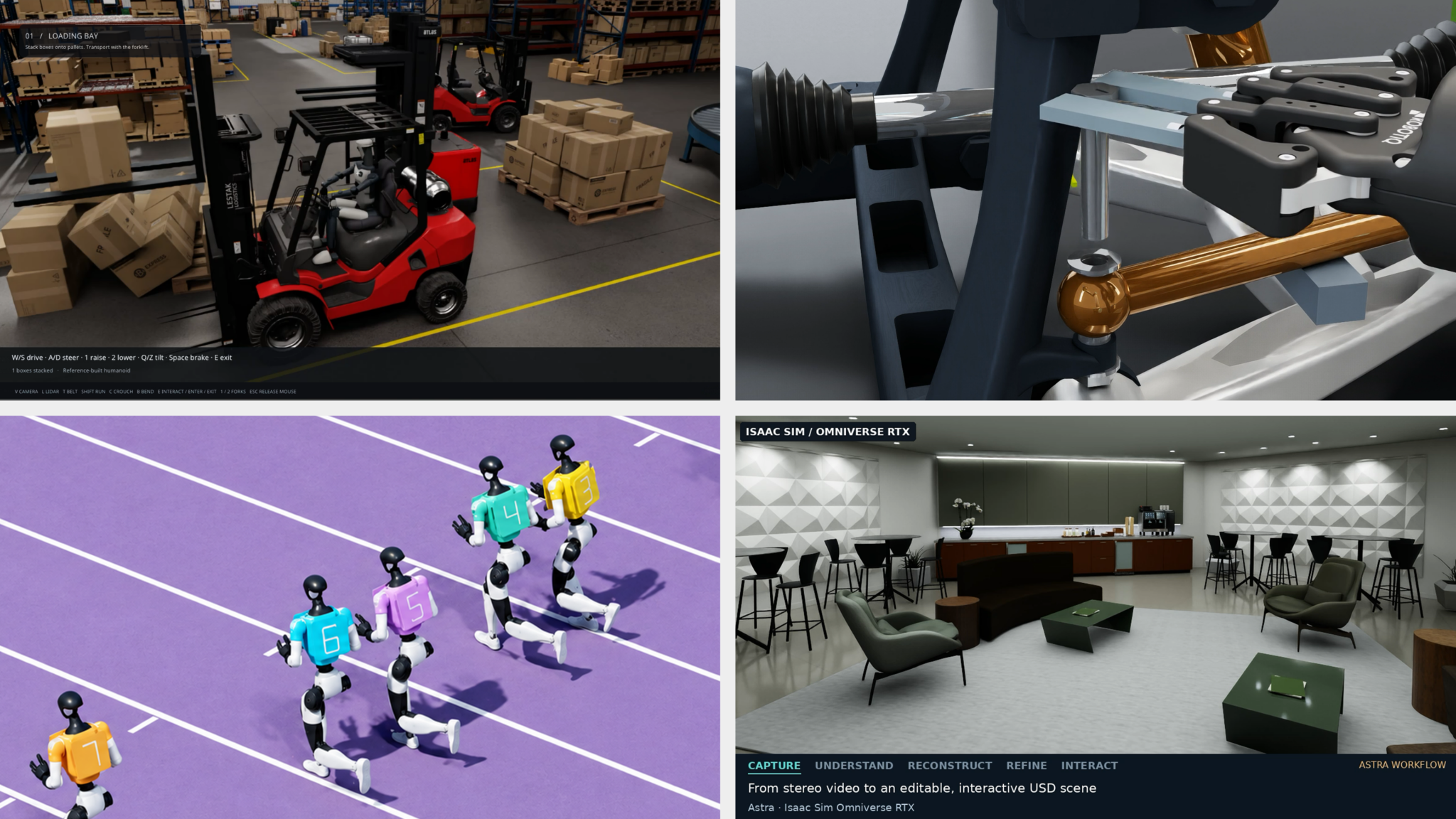
Before automating warehouse tasks, developers need an interactive simulation environment to explore task behavior and evaluate how the work gets done. Frank DeLise, Omniverse product manager at NVIDIA, used Astra to turn a SimReady warehouse and humanoid robot into an interactive simulator with first- and third-person views.
DeLise directed Astra to connect NVIDIA Omniverse libraries for physics (ovphysx), scene updates (ovstage), rendering (ovrtx) and the user interface (ovui). He also used Astra with SimReady (simready-foundation) to create the physical scene in simulation. Astra then generated animation and application code to bring those capabilities together.
Learn how to prepare and validate SimReady robot assets with frontier AI models and NVIDIA Omniverse libraries.
Connect an Autonomous-Driving Testing Workflow 🔗
https://blogs.nvidia.com/wp-content/uploads/2026/10/zero-to-alpamayo-under-10MB.mp4
Changing a scene, sensor or driving model can significantly affect autonomous-vehicle simulations. Doyub Kim, a manager on the simulation technology team at NVIDIA, asked Astra to build Zero to Alpamayo — a reusable simulation environment based on San Francisco’s Market Street.
Kim directed Astra to map out the workflow, then connect asset creation, traffic, Omniverse RTX sensor simulation and Alpamayo driving in stages, checking each integration. The resulting prototype was a testing ground for comparing models and tracing how scene or sensor changes affect downstream driving behavior. A separate Cosmos3-Nano experiment varied weather and lighting in recorded simulation videos, allowing Kim to compare the driving model’s responses to the same scenario under different conditions.
Use Sensor Differences to Create and Improve Digital Twins 🔗
https://blogs.nvidia.com/wp-content/uploads/2026/10/0_00-0_004-hubble_rivermark_Real_Sim_no_loop.mp4
Comparing recorded and simulated camera and lidar outputs gives developers key performance indicator-based feedback for refining a scene.
To test robots and autonomous vehicles, developers need to know how closely simulated sensors match real ones. Ashley Reid, who works on RTX sensor validation at NVIDIA, directed Astra and Claude Fable 5 agents to compare camera and raw LiDAR outputs with recorded data. The agents created two digital twins from scratch and improved two existing ones. Over about three days, Reid guided an iterative workflow in which agents measured differences, created or modified OpenUSD scenes, and checked the results. Changes addressed missing objects, geometry and materials, with acceptance depending on camera and LiDAR metrics. This gives developers a way to use measured discrepancies to guide scene creation and improvement.
Start by rendering an OpenUSD scene with the ovrtx minimal Python example, then define a sensor measure to compare with recorded data.
Robo Olympics: Test Robot Skills With Simulation 🔗
Teaching robots new movements means checking whether those actions work under physical constraints. Tae Kim, who leads NVIDIA Omniverse engineering and product, used sports videos and natural-language instructions to guide Astra in building Robo Olympics, an experimental project that tests simulated Unitree G1 humanoids performing sports movements.
Under Kim’s direction, Astra built controllers and refined them through physics trials. Newton Physics Engine simulated behavior, the open source NVIDIA Warp framework accelerated calculations and rendered scenes and virtual-camera images. In one experiment, the robot cleared a single hurdle in 64 of 100 simulation trials. The trials gave Kim feedback for improving the robot’s timing and control.
Watch Kim explore building simulations with Astra and NVIDIA Omniverse libraries.
Test Robotic Disassembly With Computer-Aided Design and Simulation 🔗
Before a robot can disassemble a product, developers need to know whether its tools can reach and remove the parts. Jens Jebens, a senior product manager for OpenUSD at NVIDIA, directed Astra to model a car suspension in PTC Onshape and configure it in NVIDIAIsaac Sim.
With Astra, Jebens explored computer-aided design and tooling revisions for robots informed by simulation. The agent measured the available space and designed a wrench the robot could use to reach the suspension’s bolts. Jebens reported successful removal of a suspension component in simulation. This connects design and tooling decisions to disassembly results, offering a starting point for robot policy training.
Explore the Onshape importer guide.
Bring the International Space Station Into the Browser 🔗
Turning 3D models into an application requires connecting assets, live data and an interface. Nic Johns, an engineering director at NVIDIA, prompted Astra to assemble NASA assets into an OpenUSD International Space Station model with telemetry. Johns built the application with a single prompt, then used a follow-up prompt to shift the scene to Earth’s daytime side so the planet was visible.
The workflow used Blender for asset preparation and Omniverse libraries for rendering (), scene runtime (ovstage) and streaming (ovstream). The application brings 3D models and operational data into the browser, with Johns guiding its development through prompts and corrections.
Try the Omniverse Real-Time Viewer skill.
Turn Captured Rooms Into Testing Environments 🔗
A digitally reconstructed room needs editable objects and accurate physical behavior before developers can test interactions. Chirag Majithia, from the Isaac engineering applications team at NVIDIA, directed Astra to turn stereo camera captures into an editable studio.
The workflow combined PyCuSFM, FoundationStereo and nvblox for reconstruction, with user review guiding object selection and placement. Astra assembled generated and Blender-authored assets and used USD Content Agents to configure how objects move and interact in simulation. Isaac Sim tests guided collision and contact revisions for doors and drawers. The studio connects captured geometry to interaction testing, making gaps and object behavior easier to inspect.
Have a simulation idea? Explore NVIDIA Omniverse libraries to start building with an AI agent.