News Releases Scala Scala programming
Hello everyone!
Scala plugin 2026.3 is here! This release brings more accurate Scala 3 code analysis, substantially reworked Twirl support for Play Framework developers, and more efficient compiler-based highlighting that reduces redundant background work. You’ll also find improvements to build-tool support, debugging, and everyday editing. Let’s take a closer look at what’s new.
Scala 3
This release adds support for Scala 3.10 and improves built-in Scala 3 code analysis, reducing false errors and making inferred types more accurate.
Extension methods now resolve more accurately when overloads involve different or generic receiver types, method type parameters, or implicit conversions. We’ve also corrected resolution of right-associative extension operators. Code completion, navigation, and Quick Documentation distinguish extension methods with different receiver types more clearly, and code completion lists fewer duplicate entries.
Contextual argument resolution now makes better use of method arguments and explicit type arguments when selecting given instances. This avoids false ambiguity and missing-implicit errors in generic code, including calls where type and value parameter lists alternate.
Type inference now handles transparent traits more accurately, avoiding overly restrictive collection types. We’ve also improved inference involving higher-kinded type parameters and their bounds. For anonymous classes, we’ve corrected cases where the plugin inferred structural types that the compiler does not infer.
Improved Twirl support for Play Framework
We’ve substantially reworked Twirl template support for the Play Framework, starting with a complete architectural rewrite. We followed this with extensive improvements to parsing, code completion, formatting, Find Usages, and reference resolution. Together, these updates significantly reduce false errors while making editing, navigating, and refactoring templates more reliable.
Find Usages now reliably locates the Scala code that renders a particular template before you modify it. Renaming a template automatically updates references to it across your project, keeping call sites consistent when you reorganize your Play application.
The rewrite also reduces false errors within embedded HTML, CSS, JavaScript, and JSON. Combined with the formatting and completion enhancements, working with mixed-language templates is now much easier – with fewer misleading diagnostics interrupting your work.
Build-tool improvements: sbt, Scala CLI, and BSP
In Scala plugin 2024.3, we introduced separate main and test modules to better reflect sbt’s project structure. In 2026.3, this is the only supported layout, and the option to disable it has been removed. This layout supports more accurate dependency handling and different compiler options for main and test sources.
Importing sbt 2.x projects has also improved, specifically around compiler-plugin path resolution. In addition, build-script analysis now handles .value and / expressions correctly, preventing valid settings from being flagged as unresolved errors in the editor.
Performance-wise, we’ve addressed slow project imports with Scala 3.8, as well as a BSP import performance regression.
When a Scala 3 macro implementation changes, IDE builds now automatically recompile code that depends on it when necessary. This ensures compiled code no longer retains stale macro expansions after the macro implementation changes.
Dependency-coordinate completion is back for both sbt build definitions and Scala CLI //> using dep directives. When adding a library, code completion suggestions help you quickly find the correct coordinates and insert them into your build or script.
Finally, Scala CLI scripts now benefit from improved shebang parsing, highlighting, and formatting. An inspection detects missing execute permissions in local scripts with a first-line shebang and provides a quick-fix to make them executable, allowing you to resolve the issue before running the script directly.
Debugging improvements
You can now place breakpoints on single-line conditional return statements in ordinary methods, such as if (done) return result, and stop at those statements while debugging. We’ve also resolved issues where breakpoints were skipped inside Future callbacks and within for comprehensions defined in Scala 3 top-level methods.
Inspecting state in a paused program is also significantly smoother. We’ve resolved UI freezes during expression completion and watch evaluation, fixed an issue where object expansion got stuck on Collecting data, and corrected problems with the Initialize action for lazy val declarations.
More efficient compiler-based highlighting
Compiler-based highlighting now avoids unnecessary recompilations by reusing valid diagnostics, even for files closed during compilation. Switching tabs or reopening a file that has already been checked displays the stored results. In addition, typing triggers less background work, and pending checks across multiple files are now combined into a single compilation run.
Navigating between files in a failing module no longer triggers repeated compilation attempts while the project remains unchanged. Furthermore, if errors in another module block highlighting, the editor explains the cause and provides a link to the blocking errors.
Finally, we’ve resolved several edge-case issues. Multi-module BSP compilations no longer unexpectedly skip all targets, diagnostics are no longer shifted to incorrect lines when edits occur during compilation, and highlighting errors are no longer left hidden if a compilation run is canceled.
Smaller improvements in the editor
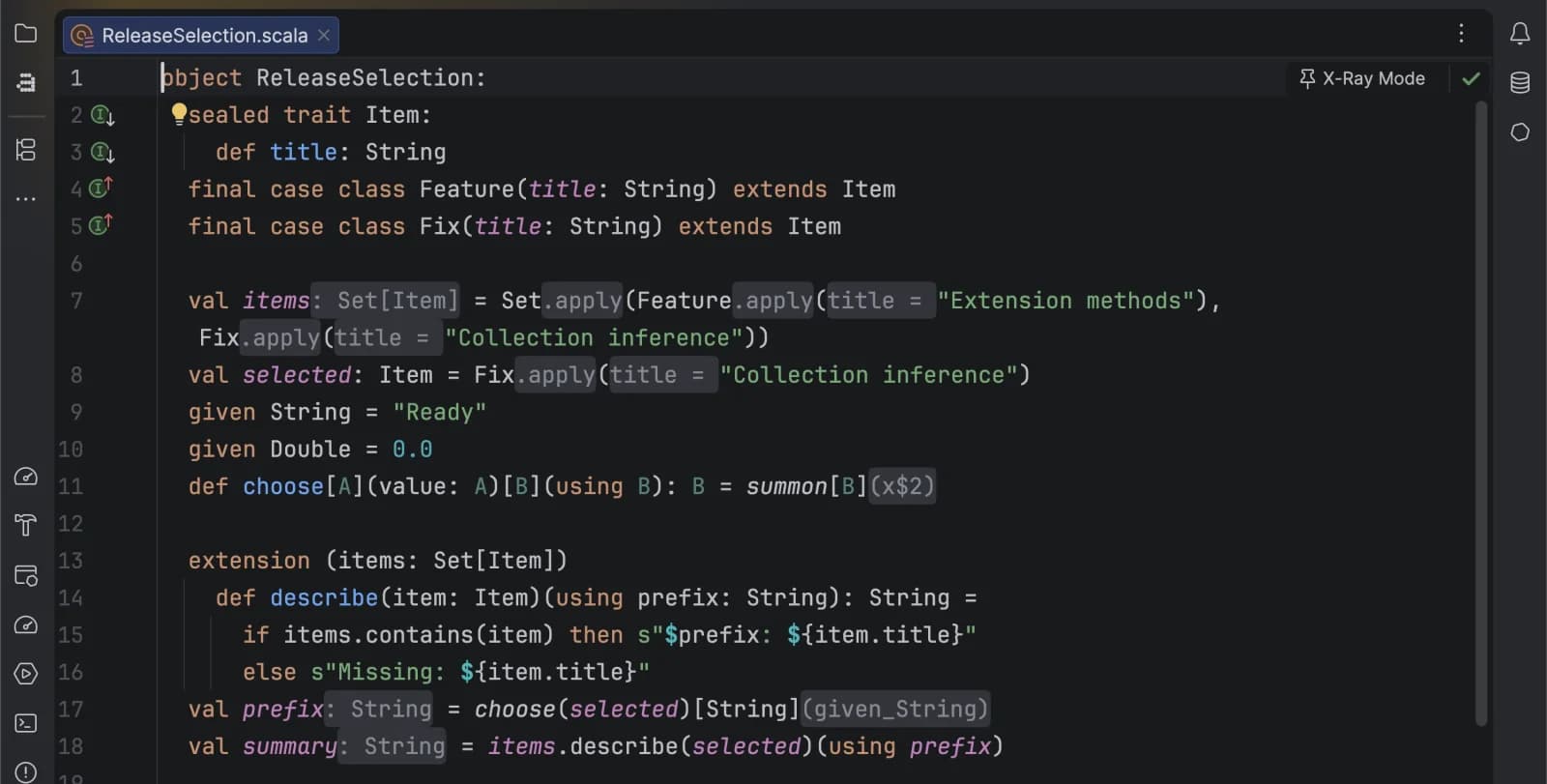
For a quicker look at inferred information, X-Ray mode now displays inferred type arguments for parameterless methods.
Go to Code | Desugar Scala Code to inspect Scala code with implicit and syntactic details expanded explicitly. For compiled Scala 3 classes, a new side-by-side view lets you compare the compiler’s interpretation with the plugin’s. This is especially useful when exploring code that relies heavily on implicit arguments or complex language constructs whose expanded forms are hard to discern from the source alone.
We’ve also resolved key formatting issues. We fixed a bug where formatting valid Scala 3 lambdas returning tuples in indentation syntax resulted in uncompilable code. We updated the integration with Scalafmt, and we corrected range formatting for partial selections and empty case bodies.
Compatibility changes and removals
Please review these changes before upgrading an existing setup:
- Ammonite: We’ve removed dedicated script support, including Ammonite run configurations and $file/$ivy assistance. You can still run Ammonite scripts externally.
- Fastpass: Fastpass integration is no longer available for project imports.
- sbt module layout: Projects now use separate main and test modules, even where this mode was previously disabled. The setting to disable separate modules has been removed.
- IntelliJ Scala Bundle: The experimental standalone distribution has been retired. Please install IntelliJ IDEA and the Scala plugin separately.
For plugin developers
The Scala plugin itself is now written in Scala 3. This internal migration requires no changes to the projects you open in IntelliJ IDEA. You can continue using their existing Scala versions and build configurations.
If you develop an IntelliJ IDEA plugin that compiles against Scala plugin APIs, rebuild it against your target Scala plugin 2026.3 build and verify compatibility with the updated API signatures and bundled dependencies. The API and dependency compatibility guide provides migration instructions.
IntelliJ IDEA 2026.3 also brings new features, performance improvements, and usability updates. Explore these changes in our What’s New and What’s Fixed posts.
As always, we welcome your feedback! Please report any issues you find on YouTrack, and feel free to ask questions or share your thoughts on Discord.
Happy developing!
The Scala team at JetBrains