
Imagine selling productivity software to a billion knowledge workers worldwide. Now, add in vastly different workflows, tools, and cultural nuances. Welcome to our daily grind at ClickUp. 👀
We’re not just battling scattered data or email chains; we’re wrestling with how to resonate with a product manager in San Francisco, inspire a designer in São Paulo, and help a founder in Berlin run a remote team like clockwork.
Our challenge? Not just growing our brand, but solving real, gnawing problems for these diverse personas.
How do we make our marketing as universally effective as our product?
You’d think the 10,000+ martech solutions out there would help us do it. But as our team scaled from 2 to 20+ marketers dispersed worldwide and our budgets tripled, we found more tools meant more chaos.
Most marketing teams face similar issues: siloed channels, runaway campaigns, ROI question marks.
That’s why we built ClickUp. Born from our own global marketing headaches, it’s our answer to the universal need for a single source of truth. And no, we don’t just preach marketing efficiency; we live it.
The proof?
We bootstrapped ClickUp to nearly $20M ARR on free, organic users. That was four years ago. Today? Revenue’s up tenfold, and we’re saving 10M+ users a day every week! 💪
That’s not just growth; that’s a marketing flywheel on steroids.
Ready to build your own?
Our marketers will show you how they use ClickUp to stay organized, move fast, and break things—across content, social, paid media, and beyond.
Get up, close, and personal with their favorite features, views, automations, and templates.
Because great marketing isn’t just about doing more; it’s about making every effort count.
Want the top ClickUp resources that help marketing teams do more with less?
We’ve pulled together our favorite templates, playbooks, and tips on how to use our favorite features for marketing campaigns to make your campaigns shine.
How ClickUp’s Marketing Team Uses ClickUp
Viewing All Marketing Initiatives in One Place
At the core of our marketing operations is a central ClickUp Workspace that acts as a command center for all our teams and channels.
ClickUp’s Project Hierarchy keeps everything organized, giving us a clear view of all our marketing activities in one place.
Spaces for different teams
We use ClickUp Spaces to organize functional teams. This keeps projects focused and ensures everyone sees the most relevant information. The marketing team has its own Space within which all our campaigns reside.
Folders and Lists for campaigns and tasks
Within each Space, we structure our campaigns using a combination of Folders and Lists.
Folders help us group related initiatives, such as all content marketing efforts or all social media campaigns.
Lists then house the campaign’s nitty-gritty Tasks, from creating social media content to building landing pages. This nested structure keeps everything organized and super easy to find. 📂
ClickUp Goals to set, track, and crush marketing goals
ClickUp Goals are a game-changer for our team. We set specific, measurable, achievable, relevant, and time-bound (SMART) goals for each campaign or project. These goals cascade down to individual Tasks, ensuring everyone is aligned and working towards the bigger picture.
With such a huge audience to market to, we want to make every campaign count!
Within overarching goals, we use ClickUp’s Targets to define specific metrics for success, like website traffic increase or lead generation. These quantifiable targets keep us laser-focused on what matters most and provide a clear, visual benchmark to measure our progress.
But reaching goals isn’t just about numbers at ClickUp—it’s about celebrating milestones along the way. ClickUp’s Milestones help us mark key achievements within a project, keeping us buzzing and energized to do hard things and grow 1% every day. 🎯
How do we maintain a high-level overview and not lose our heads with so much going on?
ClickUp Views to the rescue!
ClickUp’s Everything View is a team favorite! And it does what it promises. It provides a single, consolidated view of all our marketing initiatives across Spaces, Folders, and Lists. This allows us to quickly identify roadblocks, dependencies, and areas that need attention.
And when we need to zoom in on the details? We pick one of ClickUp’s 15+ other views:
- The List view to see all of our tasks and ideas at a glance and catalog everything from social media posts to marketing campaigns
- The Gantt view to coordinate big, cross-team projects and timelines
- The Workload and Box views to manage team resources and work capacity
- The Board view to track workflows for tasks and ideas, from conception to delivery
- ClickUp Mind Maps to draw relationships between complex ideas (such as SEO keyword research)
…and much more.
Streamlining Campaign Management through an Integrated Marketing Hub
ClickUp’s Hierarchy and views solve most of our organization problems. But what about the persistent headache of chasing down scattered campaign assets? Juggling 10+ apps for this is a huge time-sink.
Luckily, there’s an easy fix. With ClickUp, all our campaign details—from brainstorming notes to creative assets and final deliverables—live in one central location.
Arianna Young, Head of Integrated Marketing at ClickUp, couldn’t be happier about this.
Our approach to integrated marketing goes beyond just aligning campaigns with the overarching strategy. It’s about unifying all of our marketing functions, assets, and processes into a single source of truth that seamlessly integrates with the rest of our systems. ClickUp makes all of this easy to execute and and share across our teams.
Our approach to integrated marketing goes beyond just aligning campaigns with the overarching strategy. It’s about unifying all of our marketing functions, assets, and processes into a single source of truth that seamlessly integrates with the rest of our systems. ClickUp makes all of this easy to execute and and share across our teams.
Here’s how she and her team streamline campaign creation and execution with ClickUp:
Step 1: Planning the campaign
They’ve custom-created a Campaign Design Whiteboard using ClickUp Whiteboards to simplify brainstorming sessions.
It’s a collaborative workspace to map out campaign ideas, user journeys through each stage of the funnel, key milestones, and how it all fits together.
Step 2: Mapping out tasks
Once the plan is in place, the team breaks the complex components into manageable ClickUp Tasks. They use anchor tasks for the campaign’s main pillars and ancillary tasks for the supporting elements. This ensures nothing falls through the cracks.
Custom Fields in ClickUp are great for getting a bird’s eye view of all task details—such as objectives, assignees, due date, the campaign it belongs to, etc.—while Custom Statuses give everyone a real-time view of how each task is tracking towards its go-live date.
The team also uses ClickUp’s tagging capabilities to align tasks with the appropriate funnel stage, ensuring the right messaging syncs up with overall campaign goals at every step.
Step 3: Executing the campaign
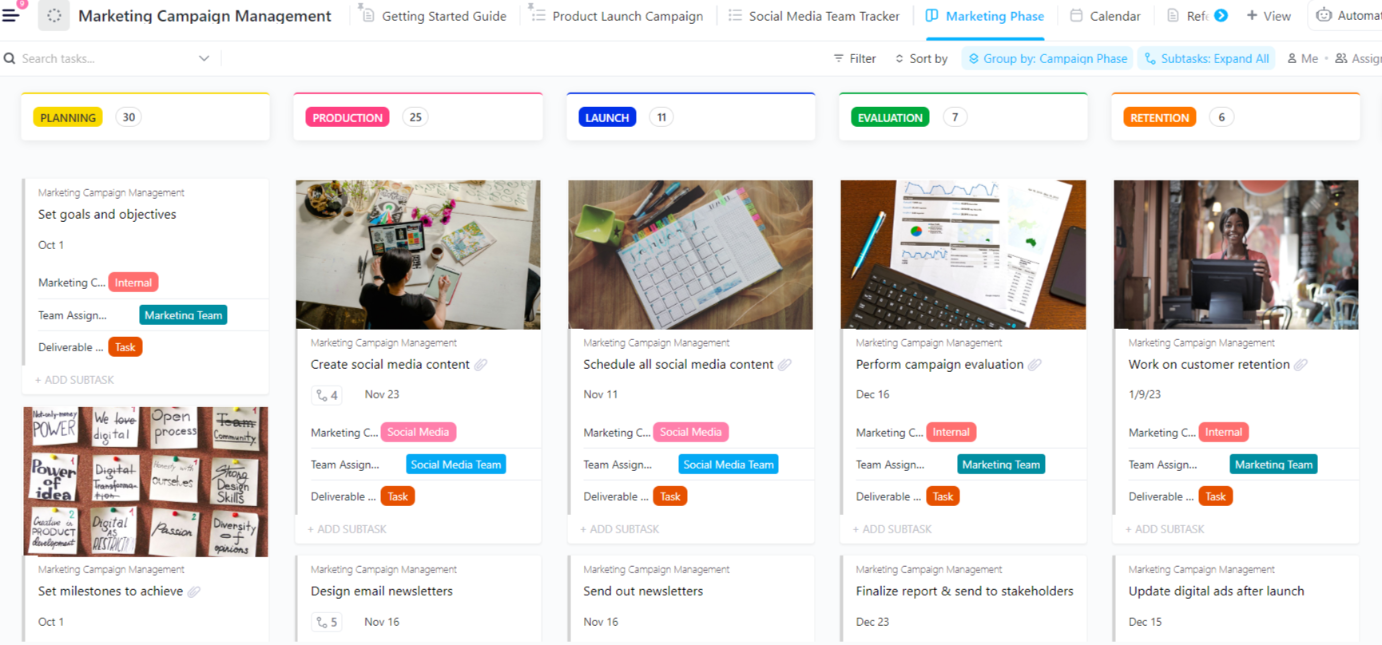
With all tasks built out, the team switches to ClickUp’s Calendar view to visually track when every component goes live and ensure all messaging and branding stay cohesive.
Throughout the process, comment threads, @mentions, and ClickUp’s Chat capabilities make collaborating across teams seamless.
Arianna and her team have happily bid goodbye to context-switching, scattered feedback, and siloed work!
Managing Multiple Marketing Channels, Functions, and Teams Together
It’s not just the integrated marketing team that uses ClickUp to tame the multi-headed beast that marketing is.
Our SEO team lives inside the platform—they even send and respond to their emails from within ClickUp. And our demand-gen team bulletproofs each email campaign with a meticulous ClickUp workflow.
Here’s how each marketing unit at ClickUp uses ClickUp.
ClickUp for field marketing and event management
Our field marketing team relies on ClickUp to plan and execute events of all sizes, from small webinars to large conferences. Event logistics, attendee registration, follow-up, and post-event reporting happen seamlessly within one centralized event workspace.
But we don’t stop at just executing great events. One of our core philosophies is to learn from every experience through rigorous post-mortems and templatized learnings.
The templates create a flywheel of continuous improvement by capturing feedback to prevent repeat mistakes.
The templates create a flywheel of continuous improvement by capturing feedback to prevent repeat mistakes.
This templatization also allows us to iterate and execute even faster for the next event. And with dedicated Event Templates in ClickUp, transforming past learnings into future successes is just a few clicks away.
The team recommends these top three event templates for fellow event marketers.
1. The ClickUp Event Brief Template
The ClickUp Event Project Brief Template is our roadmap to successful event management.
It breaks down all event phases into actionable steps—from pre-planning to post-event evaluations. It also has built-in assignee and deadline management to ensure clear ownership and timely execution of each task.
2. The ClickUp Event Planning Document Template
Need a day-of checklist to overcome those planning jitters? We often do.
The ClickUp Event Planning Document Template is our ultimate event planning checklist, covering everything from setup details and vendor lists to a comprehensive invitation list. We can even customize it further with subpages and easily accessible formatting!
3. The ClickUp Event Management Template
Consider ClickUp’s Event Management Template the stepping stone to a stress-free event experience.
Manage multiple events simultaneously with dedicated Lists, Custom Statuses, and workflow views. You also get eight Custom Fields for filtering, sorting, and grouping tasks based on budget items, so cost overruns are a thing of the past.
ClickUp for Demand Generation Management
Email nurture campaigns are at the heart of any demand-gen engine. But without the right processes, keeping all stakeholders aligned on messaging, creatives, and cadence can be a nightmare.
Enter ClickUp’s automated email QA (Quality Assurance) process, which Libby Lienhoop, Head of Segment Marketing at ClickUp, calls “checks and balances, with an audit trail all in one.”
Here’s how it works:
- A ClickUp Task and an email alias are created for the email QA
- The email is sent to the email alias, and every stakeholder is pulled in with a link to the Task to provide feedback
- In the background, the email is routed to an external AI API for spellcheck, contextual reviews, and more quality checks
- The marketing leadership team gets notified in a dedicated Slack channel to proof the email as well
- All feedback comes directly into the ClickUp Task, centralizing communication, eliminating scattered info, and speeding up the turnaround time on email comms
This is just one of the ways we error-proof our work as marketers and avoid sending “Hey, Sam!” as the opening greeting to ALL of our thousands of subscribers. Hypothetically. 😄
We’ve also got other battle-tested ClickUp features to keep our demand-gen machine firing on all cylinders:
- ClickUp Dependencies: Instead of manually checking when blockers are cleared, we get automatically notified when we’re unblocked to take action on a task. No more treading water; Dependencies take all the hassle away
- Version control: Whether it’s an email copy doc or landing page outline, ClickUp Docs maintains a full audit trail of all edits, revisions, and feedback for a single source of truth on important team- and company-wide documentation
- Watching Tasks: With many folks collaborating across projects, the Watch feature allows anyone to subscribe to a consistent stream of updates on pertinent tasks without having to go look for them manually 👀
We’ve simplified our tech stack by integrating our marketing automation, CRM, lead scoring, and other critical demand-gen tools into ClickUp while maintaining a comprehensive view of every lead, nurture campaign performance, and conversion metric.
The foundational work of setting up the right processes and systems in ClickUp is like pulling back a slingshot. With the right tension and setup, you’ll be able to hit your targets faster and more efficiently. Be careful about overindexing on it, though, to prevent it from snapping.
The foundational work of setting up the right processes and systems in ClickUp is like pulling back a slingshot. With the right tension and setup, you’ll be able to hit your targets faster and more efficiently. Be careful about overindexing on it, though, to prevent it from snapping.
ClickUp for SEO Management
SEO is a game of optimizing keywords, rankings, and relationship-building to get our organic content in front of as many people as possible. Our SEO team utilizes some powerful ClickUp features to stay ahead of the curve.
Jeremy Galante, SEO Manager at ClickUp, can’t stop raving about ClickUp’s Embed view to bring data from search reports, keyword tools, and more right into his Workspace.
He and Adele Payant (SEO Specialist at ClickUp), also frequently build out Mind Maps to visualize complex keyword strategies and brainstorm on clusters around content topics.
Their top features to consistently climb search rankings?
- ClickUp’s Table view: It helps them track all outreach and manage relationships with media publications and link-building partners. Think of it as a CRM for SEO efforts and earned coverage
- Emails in ClickUp: The ability to send partners emails directly from ClickUp saves SO MUCH time and prevents unnecessary context-switching, ensuring they’re on top of all the backlink and partnership opportunities
- ClickUp Automations: Adele’s favorite feature, Automations reduce the need for manual Tasks and ensure that nothing in the SEO process is missed, enabling the team to maintain consistency, meet deadlines, and optimize content efficiently
We create a lot of content at ClickUp and in a high-volume content environment, ClickUp Automations are a game-changer. We stay proactive by setting Automations to trigger optimization tasks based on a page’s rank after a certain period post-publication. If the rank falls short of our expectations, for example, not ranking on page 1 after 90 days, an optimization task is automatically created, prompting us to take action and improve the page’s performance
We create a lot of content at ClickUp and in a high-volume content environment, ClickUp Automations are a game-changer. We stay proactive by setting Automations to trigger optimization tasks based on a page’s rank after a certain period post-publication. If the rank falls short of our expectations, for example, not ranking on page 1 after 90 days, an optimization task is automatically created, prompting us to take action and improve the page’s performance
Surprise, surprise! Our social content lives in a dedicated ClickUp List.
Honestly, can you think of anything better than Custom Fields to detail each post’s messaging, channel, date/time, media links, and more? This bird’s eye view helps us visualize our complete cross-platform social strategy on ONE screen. Priceless! 🤩
ClickUp’s Integrations also make it easier to monitor brand mentions, sentiment, and engagement across social platforms—all from our ClickUp hub.
“At ClickUp, my top 3 features for everyday social media management are Dashboards, Calendar View, and Automations. Dashboards provide us with a customizable overview of key metrics, campaign performance, and team activity, helping us make data-driven decisions at a glance.The Calendar view allows us to visualize our content schedule, plan campaigns effectively, and maintain a consistent posting rhythm.Automations streamline repetitive tasks like assigning team members or updating statuses, freeing up our time for creative strategy and engagement.These features not only enhance my social team’s efficiency but also allow me to get creative and track all things social smoothly and easily.
“At ClickUp, my top 3 features for everyday social media management are Dashboards, Calendar View, and Automations.
Dashboards provide us with a customizable overview of key metrics, campaign performance, and team activity, helping us make data-driven decisions at a glance.
The Calendar view allows us to visualize our content schedule, plan campaigns effectively, and maintain a consistent posting rhythm.
Automations streamline repetitive tasks like assigning team members or updating statuses, freeing up our time for creative strategy and engagement.
These features not only enhance my social team’s efficiency but also allow me to get creative and track all things social smoothly and easily.
ClickUp for Paid Media Management
Between ad campaigns, landing pages, creative production, and analytics, paid advertising has many moving parts. ClickUp helps our paid media team bring it all together:
- Using ClickUp’s integrations and Embed view, we can bring all our ad campaign data and analytics from third-party tools into one centralized place in ClickUp. No more toggling between a dozen different platforms!
- From briefing to production, ClickUp houses our entire ad creation workflow. Customizable views and task statuses give us full visibility into where every asset is in the creation process—a non-negotiable when you’ve millions of dollars on the line!
We swore to ditch cumbersome, scattered spreadsheets and organize all our paid campaigns by bringing them into a Table view, each with its own Custom Fields for links to the relevant ad platform, data sheets, and more.
Then, we could dive deeper by pulling up the task for a specific Google or Facebook ad, each with its own subtasks relevant to that ad’s workflow.
The best part is that ClickUp’s Dashboards and Reports eliminate the need to juggle multiple external reporting tools. We can also embed reports from platforms like Google Sheets directly and drill down deep into performance metrics.
ClickUp for Product Marketing
ClickUp is our go-to-market mission control.
All our sales enablement materials live in a dedicated Folder, ensuring sales teams can easily access the latest assets.
But ClickUp doesn’t just help us store resources, it lets us choreograph every piece of the product marketing strategy into one unified launch playbook.
Our product marketers use the Table, Calendar, and Board views to meticulously schedule and track every component—product announcements, supporting webinars, new launches, and more.
Another top feature is Tasks in Multiple Lists or TIML. Create a Task once, then easily duplicate or templatize it across multiple campaigns with all Custom Fields intact.
As a product marketer, nearly everything I do is cross-functional in nature. Tasks in Multiple Lists or TIML is one of my favorite ClickUp features that makes managing all this work super easy. I just add all the tasks I’m a part of, whether they live in my product managers list or my creative team’s list, to my task list so all the projects I’m involved in are front & center in my workflows. It really helps cut down on duplicate tasks, too.
As a product marketer, nearly everything I do is cross-functional in nature. Tasks in Multiple Lists or TIML is one of my favorite ClickUp features that makes managing all this work super easy. I just add all the tasks I’m a part of, whether they live in my product managers list or my creative team’s list, to my task list so all the projects I’m involved in are front & center in my workflows. It really helps cut down on duplicate tasks, too.
ClickUp for Content Marketing Management
Our collective mission at ClickUp is to “Save people time by making the world more productive.”
Helpful, valuable, intelligent content is one of our biggest levers to achieve this. It is also the fuel that powers our entire marketing engine.
From blog posts to ebooks to multimedia assets, ClickUp helps us ensure that this content is produced efficiently and effectively, maximizing its utility to everyone who visits our website.
Each piece of content we produce gets its own ClickUp Task. Thanks to ClickUp Automations, every blog post Task that originates in the SEO Folder (with ideation, keyword research, and brief creation) automatically moves to the Content Folder. Here, it’s assigned to writers, proofed by editors, and published on ClickUp’s WordPress blog. We track its performance and handle optimization tasks here, as well.
Right from keyword research to publishing, a village of content marketers operate with complete transparency in a single task. Custom Statuses and Task threads meticulously track each post’s workflow, from initial brief creation to publishing, recording any revisions, feedback, and QA checks along the way.
Right from keyword research to publishing, a village of content marketers operate with complete transparency in a single task. Custom Statuses and Task threads meticulously track each post’s workflow, from initial brief creation to publishing, recording any revisions, feedback, and QA checks along the way.
When you produce content at a scale like ours (200 blog posts a month! 😮), you HAVE TO plan out the entire editorial calendar months in advance. Within the Content Folder, the List and Calendar views allow our writers and editors to do just that, and do it well.
The ClickUp Multiple Assignees feature is also extremely useful for ensuring that the writer and editor never lose track of their assigned blog posts and can work on them through successive stages with full visibility.
Collaboration is seamless, with ClickUp Docs used to record style guidelines, generate content briefs, discuss creative ideas, and edit drafts in real time. 📝
Our writers frequently use ClickUp Brain 🧠, one of the world’s most powerful AI assistants, to brainstorm new content topics and ideas and polish their writing.
But ClickUp doesn’t just optimize the production process, it enhances the content experience as a whole through features like:
- Task assignments for seamless content handoffs
- Version control to track all rounds of revisions
- Built-in approval processes for greater accountability and transparency
ClickUp for Customer Marketing
Our customer stories and case studies are arguably our most powerful marketing assets for driving trust (and new business!).
We house a comprehensive customer story library within ClickUp. This library integrates custom views tailored for different functions. 📚
For example, our “Quote Library” contains simple reviews from individual productivity enthusiasts that our content team can use in various assets. The “Upmarket Stories” view includes all the customer case studies primed for our enterprise sales reps to close big-ticket deals.
We even use ClickUp Forms’ conditional logic capabilities for a seamless case study intake process. When customers fill out the intake forms, the responses land directly on our case-study working list. After a review, they’re auto-added to the live library for various use cases.
When we need to quickly reference the perfect customer story for a particular use case, industry, or product line, ClickUp Brain’s natural language commands help us instantly surface relevant matches.
ClickUp for Creative Management
Behind every compelling marketing asset is a creative team working their magic. If you love our GIFs and TikToks, our design and creative team deserves all the credit. 🎨
They use ClickUp’s Design Project Management Software to receive, prioritize, and collaborate on creative requests.
How?
Brian Sherry, Head of Creative Ops at ClickUp, shares an overview.
We use conditional logic Forms in ClickUp to ask specific questions and get clear inputs for the creative brief. The key is not making the forms too large & unapproachable.
And there’s always ClickUp Clips’ helpful screen recording feature for quickly going through the design feedback.
Give your team the gift of ClickUp today! 🎁