When we put out the initial release of Fortify Agentic Analyzer this summer, we were moving quickly. The market had shifted almost overnight. AI coding assistants were generating more code, faster, than security teams could keep up with (which isn’t new, but AI exponentially accelerated the problem). The old assumption that a human carefully reviews everything before it ships was never really a reality, but the explosion of AI changed the velocity to a fever pitch. We knew that agentic analysis was the right answer, and we didn’t want to sit on it. So we got it into people’s hands.
I wrote at the time about what it is and why it matters in Level up your agentic AppSec powers, and we followed up with hard evidence of the kinds of bugs it actually finds in Applying agentic analysis to real AppSec problems. If you want the broader argument for why the future of application security is hybrid rather than any single tool, that one is here: AI didn’t break application security.
Since then, something more useful than any amount of our own theorizing has happened: people have been using it. On real codebases, in real pipelines, under real constraints. And they have told us, in detail, what worked, and what they needed next.
26.4 is what we did with that.
26.4 marks Fortify Agentic Analyzer shipping as part of our normal release cadence, alongside our other on-premises products. The initial release was built fast, in response to an urgent need. 26.4 is the point where it settles into being a regular, dependable part of the Fortify portfolio: on the same release cadence as Fortify SAST, with documented release notes, version support, and a predictable upgrade path, like everything else we ship.
Here is what changed, and why.
First, if you are new to this
Fortify Agentic Analyzer uses AI agents to reason about your source code the way a good reviewer would. Not pattern matching, not tracing tainted data from a source to a sink, but actually reasoning about what the code is trying to do and where that goes wrong. That lets it find the things traditional static analysis structurally cannot: broken authorization, flawed authentication design, business-logic bugs, the vulnerabilities that live in what the code fails to do rather than in some traceable data path.
It does not replace Fortify SAST. SAST is fast, broad, and deterministic, and it stays your first line of defense on every build. Agentic analysis is the deeper, more selective pass on top. The two are complementary, and I mean that in the real sense: they find different things, and you want both. Its findings land in the same Fortify workflow you already use.
With that out of the way, let’s talk about 26.4.
Where Fortify Agentic Analyzer fits in our AI work
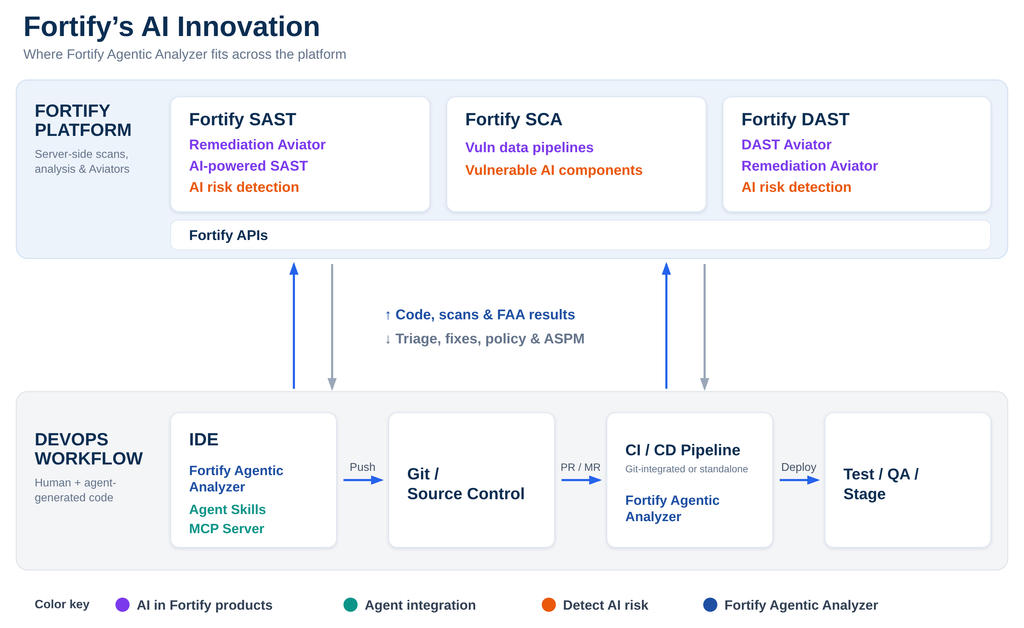
One thing I want to be clear about: Fortify Agentic Analyzer is not a side project. It is one piece of how we are applying AI across the whole Fortify platform, and it helps to see the whole picture.
Remediation Aviator triages findings and generates fixes. AI-Powered SAST extends static analysis to additional languages. AI risk detection looks for the new categories of risk that AI-generated code and LLM features introduce. Agent Skills and our MCP server put Fortify capabilities directly inside the agentic workflows developers already use. And Fortify Agentic Analyzer finds the vulnerabilities that rules-based analysis cannot reach. These are deliberately distinct capabilities. They do different jobs, and we are careful not to blur them together. But they run on the same platform, feed the same workflow, and point in the same direction: security that keeps up with how software is built now. The diagram below shows how the pieces fit, from the IDE through the pipeline and back into the Fortify platform.
For more on the individual pieces: Remediation Aviator product page; Fortify Agent Skills; and Introducing AI-Powered SAST.
Scan uncommitted changes, without a full scan first
We already supported incremental and differential scanning against a baseline. In 26.4 we added non-baselined differential scanning, and this one came straight from how people actually work. You no longer need a full scan sitting there as a reference point. You can point Fortify Agentic Analyzer at a pull request, a merge request, a branch, or simply the uncommitted changes in your working directory, and analyze just that. It makes agentic analysis practical in the moment code is written and reviewed, not only in scheduled runs.
More ways to get results out
SARIF is great for tooling, but a lot of what people wanted to do with FAA’s output did not involve a SARIF consumer at all. So we added Markdown, in a few shapes: a short summary file, a single detailed file with everything in it, or a folder with one Markdown file per issue plus an index tying them together. That sounds mundane until you see what it unlocks. In particular, it makes FAA a clean first step in an agentic workflow, where another agent picks up the Markdown and acts on the findings. Output that another tool, or another agent, can actually read is half the battle.
Cost and determinism
Agentic analysis is very good at finding issues, but it comes with two trade-offs against traditional static analysis: it costs more to run, and it is not fully deterministic. Run it twice and the results will not always match. Both are inherent to the approach, at least for now.
26.4 gives you more control over both. Stronger controls on token spend let you set how much a scan is allowed to cost. And we have improved determinism on the findings that matter most, so the important results stay stable from run to run, even if the long tail still shifts. Both stay near the top of our roadmap.
Connecting to your LLMs your way
One pattern we saw again and again: teams do not want to point FAA straight at a hyperscaler. They want to go through their own API gateway or AI gateway. Sometimes that is governance, but very often it is cost control, which ties back to the point above. So in 26.4 we added a TypeScript-based plugin mechanism that lets you put whatever you need in between FAA and the model.
A concrete example: one client’s API gateway required a custom HMAC signature on every single request. That is the kind of bespoke requirement that normally gets a “sorry, not supported.” With the plugin mechanism, FAA signs the requests the way their gateway demands, and it just works.
Where this is going
If there is a theme to 26.4, it is that the people using Fortify Agentic Analyzer are the ones shaping it. Lower-friction scanning. Output that fits real workflows. Real levers on cost and consistency. Freedom to connect to models the way your organization actually operates. None of that came off a whiteboard. It came from users. That is the loop we want to keep running. If you want to see how FAA fits next to Fortify SAST in a full application security program, take a look at the Fortify Agentic Analyzer solution page . For the technical details, see the Fortify Agentic Analyzer 26.4 user guide and the SAST 26.4 documentation. And if you are already using it: keep telling us what is working and what’s not. It goes into whatever we build next.
See what agentic analysis can uncover
Discover how Fortify Agentic Analyzer works alongside Fortify SAST to find complex vulnerabilities traditional analysis can miss.