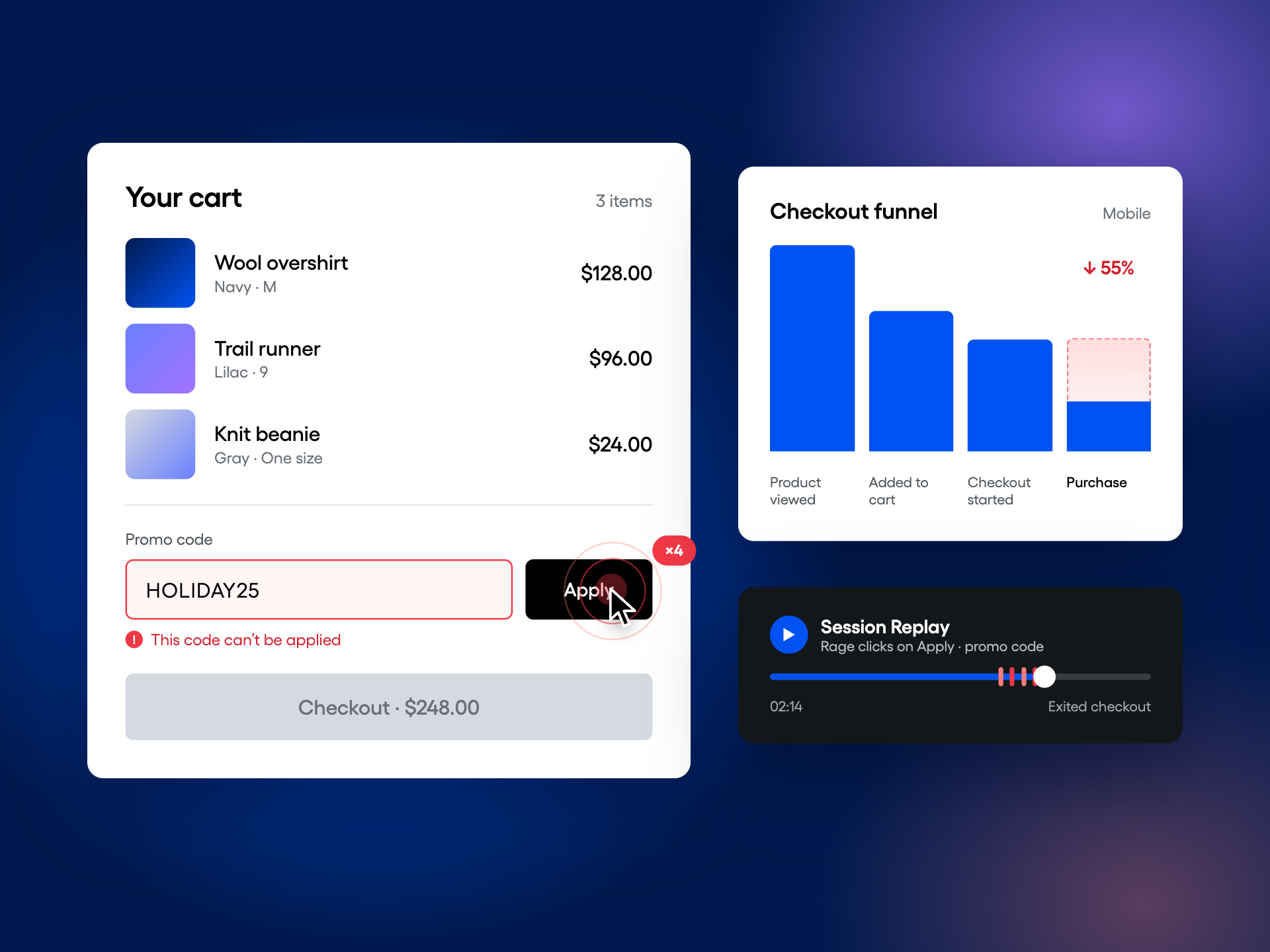
Imagine a shopper with a full cart entering a valid promo code, only to get an error with no explanation. Some will try again. Others will leave. When holiday traffic climbs, that same problem can stand between more shoppers and a completed purchase.
Peak season can amplify the friction already in your purchase funnel. Payment errors, confusing cart messages, surprise shipping costs, and slow product pages all become more expensive as traffic grows. Higher demand can also expose new problems, which is why preparation and monitoring both matter.
The priority before this holiday season is to stop losing shoppers who are already trying to buy. A checkout redesign can wait. A broken payment form, a rejected valid promo code, or an unnecessary step between a full cart and a completed order deserves attention now.
Fender found exactly that kind of opportunity. Using Amplitude Funnel Analysis, its team identified a redundant cart review step where shoppers were leaving after providing their information. After removing it, Fender reported a 27% increase in overall conversions. A focused change addressed a specific obstacle to buying.
Pinpoint where high-intent shoppers leave
Follow the path from product interest to purchase, then concentrate on the steps where shoppers have shown clear intent. Four transitions are enough to start:
- Product viewed to added to cart
- Cart to checkout started
- Checkout started to payment submitted
- Payment submitted to purchase completed
Within checkout, inspect what happens when shoppers apply a promo code or select shipping. These are moments when someone ready to buy can encounter a surprise or a roadblock. A drop-off tells you where to investigate; it doesn't explain the cause.
Break down the funnel by device, acquisition channel, and new or returning shoppers. An overall conversion rate can hide a problem affecting one group, such as mobile shoppers arriving from a paid campaign. Compare both the drop-off rate and the number of shoppers affected to prioritize the biggest conversion opportunities. Add geography, promotion, or payment type when those properties are available and relevant.
For a product-level view, check that your cart and purchase events include product arrays, then configure Purchase by Product in the ecommerce hub. Merchandising properties capture discovery context, while persisted properties with item-level attribution connect it to later purchases; use the setup guide if you need to investigate which products or discovery sources are associated with drop-off.
Understand what gets in the way
A funnel shows where shoppers leave. It doesn't establish what caused them to leave. If mobile checkout completion falls by six percentage points, you still need to investigate what shoppers experienced at that step.
Connect those funnel drop-offs with Amplitude Session Replay to watch available recordings of shoppers who left. Look for confusing steps, promo-code problems, and shipping or payment friction:
- Repeated clicks on something that isn't responding
- Shoppers stuck on the promo code field
- Shoppers going backward right after they see shipping costs
- Payment errors
- Form fields that fight back, like autofill glitches or the wrong keyboard
- Exits right after an inventory or price change
Keep finding friction as shopping conditions change
A checkout checkup gives you a list of problems to address now. Through peak, inventory, promotions, and releases can change what shoppers experience. Give the team a way to spot recurring friction without asking someone to spend every morning watching recordings.
Set up the Session Replay Agent before peak to review your checkout funnel on a recurring schedule. It analyzes sampled recordings and returns findings with supporting clips, giving the team concrete evidence to investigate. Choose a reporting cadence and an owner for reviewing the findings, and check that you're capturing enough replays of the flow. Use the reports alongside conversion metrics to decide what needs attention.
Decide what's worth fixing before peak
Start with problems that prevent shoppers from completing a purchase: a payment form that won't submit, a valid promo code that gets rejected, or a checkout button that doesn't respond. Use funnel data to see how many shoppers are affected and replays to understand what happens when they try to continue.
Then look for moments that make shoppers hesitate or backtrack. Are they returning to the cart after seeing shipping costs? Re-entering information because a form is unclear? Focus on recurring patterns that line up with drop-offs, and use them to identify specific changes worth testing.
Bring engineering a clear problem to solve, with the affected funnel step, the shopper segment, and a replay that shows the issue. Agree on what can be safely fixed before peak and what needs more time. A broken payment form needs a fix; a new way of presenting shipping options needs a test.
Test what helps shoppers complete a purchase
Once you've identified a friction point, define the change you expect to help and how you'll measure it. For example, clearer cart messaging might reduce confusion about a promotion, or showing shipping costs earlier might help shoppers decide to continue.
Use Amplitude Experimentation to test checkout flows, shipping offers, or cart messaging against the current experience. Choose completed purchases as the primary outcome and track order value alongside it. More clicks on a checkout button don't tell you whether more orders were completed.
Set the audience, success metric, and test duration before launch. Run the test early enough to review the results before your release cutoff. Holiday traffic and promotions can change shopper behavior, so a simple before-and-after comparison may give a misleading picture of a change's impact.
Fender's result illustrates the value of removing a specific obstacle. For changes where the benefit is less certain, such as a shipping offer or new cart message, use an experiment to find out whether the experience helps more shoppers buy.
Keep the change if the results support it. If they don't, use what you've learned to refine the next test.
Build your holiday conversion watchlist
Keep your checkout metrics and scheduled agent reviews running through peak. The metrics show changes in purchase completion; agent reports give the team recurring evidence of what shoppers encounter. Review them together to decide where to investigate.
Pick five to ten, and make them specific:
- Checkout completion rate
- Payment failure rate
- Promo-code error rate
- Mobile checkout conversion
- Add-to-cart to purchase conversion
- Shipping step drop-off
- Checkout completion by acquisition channel
Then do the part most teams skip. Decide now what "bad" looks like for each one, who gets pinged, and what they're allowed to do about it. You don't want to be debating thresholds at 9 a.m. on Black Friday while revenue leaks.
Peak season rewards the teams that looked early
Your holiday traffic plan brings shoppers to the store. Checkout readiness helps those already trying to buy finish the job. Start with the steps closest to purchase, remove the obstacles you can verify, and test changes whose benefit is still a question.
The goal is to turn more high-intent visits into completed orders. Keep measuring through peak so you can see whether improvements hold up and catch new friction as it appears.
Run your holiday conversion checkup in Amplitude. Start with Session Replay to investigate shopper friction, then use those insights to prioritize and test improvements.